

If you run your online store with Magento and use Merlin to handle things like stock, prices, or products, you might want them to work together. That’s where Magento Merlin integration helps. It connects your website with your back-office system so everything stays in sync.
With this setup, you don’t have to update things twice, your data stays accurate, and your customers get a smoother shopping experience. In this guide, we’ll look at what Magento Merlin integration is, how it works, and how it can make managing your online shop easier.
What is Magento and Merlin Integration?
Magento Merlin integration connects your Magento e-commerce store with Merlin’s business management system. It synchronises essential data such as product details, pricing, stock levels, and customer information, keeping both platforms perfectly aligned.
Instead of manually updating data between systems, the integration automates the flow of information, reducing errors and saving valuable time. For businesses managing large catalogues or multiple channels, it ensures every product shown online reflects accurate, real-time information from Merlin.

Why Integrate Magento with Merlin?
Connecting Magento with Merlin gives online shops the best of both systems. Magento handles your online sales, while Merlin manages the behind-the-scenes tasks like stock, orders, and pricing.
When they work together, everything runs more smoothly and updates happen automatically. Here’s how that looks in everyday use:
- Real-time data accuracy – product availability, descriptions, and pricing automatically sync.
- Faster order fulfilment – orders appear instantly in Merlin for processing.
- Reduced admin time – no duplicate data entry.
- Better customer experience – stock levels and delivery updates remain accurate.
In short, Magento Merlin integration creates a seamless bridge between sales and operations, keeping your business running efficiently.
How Does Magento Merlin Integration Work?
The Magento Merlin integration typically uses an API or middleware platform that connects both systems securely.
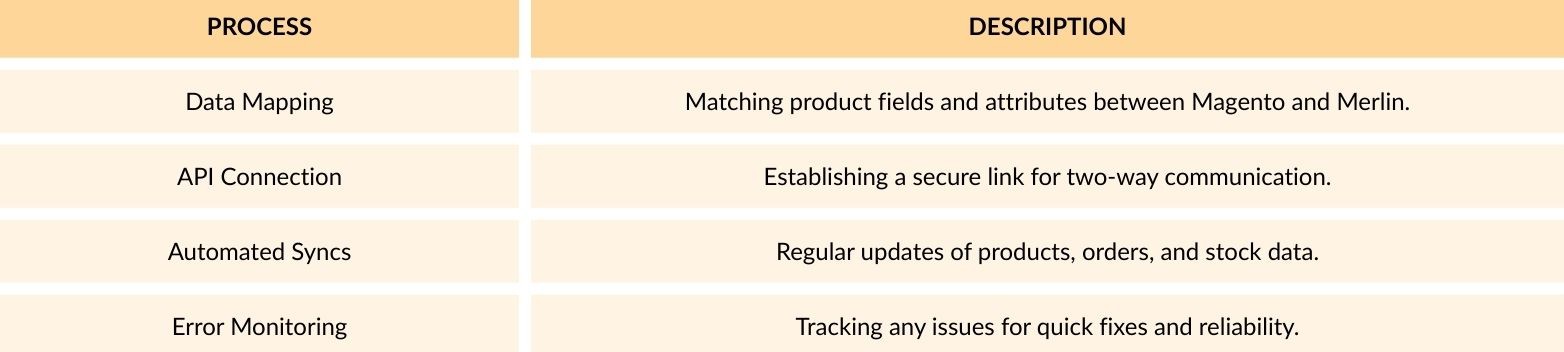
Each integration can be tailored to fit your business workflow. For example, a retailer might configure Merlin to push warranty details, product specs, or category updates directly to Magento product pages.
Key Benefits for E-commerce Businesses
1. Accurate Product Data
When you update a product in Merlin, such as changing a price, adding a new item, or updating a description, it automatically updates on your Magento store too. This means everything stays up to date without you needing to do it twice. Your customers always see the right information, which makes your store look more professional and helps prevent confusion.
2. Simplified Stock Management
Keeping track of stock can be hard work, especially when you sell across different channels. With Magento Merlin integration, your stock levels update in real time. If an item sells on your website, it is immediately updated in Merlin. This stops you from selling products that are already out of stock and helps you plan reorders before you run low.
3. Faster Order Processing
As soon as a customer places an order on Magento, it appears straight away in Merlin. Your team can start preparing and sending it out without waiting for updates or emails. This speeds up your delivery times and gives your customers a better experience. It also reduces manual data entry, which means fewer mistakes.
4. Better Reporting
When Magento and Merlin work together, all your important information is in one place. You can easily see your sales numbers, profit margins, and stock levels. This makes it simpler to understand what is selling well, which products need restocking, and how your store is performing overall. Clear reports help you make smarter decisions for your business.
5. Scalability
As your business grows, managing everything manually becomes difficult. Magento Merlin integration grows with you, handling more products, more orders, and more customers without extra effort. It keeps everything running smoothly in the background so you can focus on growing your sales instead of fixing admin tasks.
Common Integration Challenges (and How to Sort Them Out)
Even with good planning, setting up a Magento Merlin integration can sometimes bring a few bumps along the way. Below are some common problems and how you can deal with them before they slow things down.
1. Unmatched Product Details
Sometimes product data in Merlin and Magento does not line up correctly. Things like categories, product names, or codes can get mixed up, which causes errors during syncing.
How to fix it: Plan your data setup before you start. Make sure both systems use the same format for product fields and categories to keep everything consistent.
2. Slow or Delayed Updates
If you have a large product range or high website traffic, syncing information between systems can take longer than expected. This can cause stock levels or prices to display incorrectly for a short time.
How to fix it: Adjust your sync timing based on your sales activity. You can set updates to run more often during busy hours and less frequently when things are quiet.
3. Repeated or Missing Data
When the integration is not set up properly, you might see duplicate listings or missing products on your site. This usually happens because of incorrect mapping or incomplete data.
How to fix it: Test everything with a small batch of products before going live. This lets you catch and fix any errors before they affect your whole store.
Magento Merlin Integration Best Practices
Following a few simple steps can make sure your Magento Merlin integration works smoothly and continues to perform well as your business grows.
Here are some practical tips to help you get the most out of your setup.
1. Map Your Data Properly
Before connecting the systems, check that SKUs, product names, and categories match in both Magento and Merlin. This keeps your product data clean and prevents syncing problems later on. A little time spent setting this up correctly can save you hours of fixing errors down the line.
2. Automate Smartly
Automation is great, but it needs balance. If your store updates too often, it can slow things down. If it doesn’t update enough, data may go out of date. Find a schedule that suits your sales pace so your product details and stock stay accurate without overloading the system.
3. Monitor Integration Health
Keep an eye on your integration logs and reports. They can show you if something isn’t syncing as expected. Regular checks help you fix small issues before they affect your customers or cause delays in orders.
4. Keep Systems Updated
Using the latest versions of Magento and Merlin helps your integration run faster and more securely. Updates often include performance improvements and bug fixes that make syncing smoother and more reliable.
5. Test Before Going Live
Always test your integration in a staging or demo environment first. This lets you see how everything works without affecting your live store. Once you’re confident everything is syncing correctly, you can switch it on for customers with peace of mind.
Why Work with a Magento Integration Partner
Magento Merlin integration is rarely plug-and-play. Each business has its own systems, goals, and workflows, which means a tailored approach is essential.
A certified Magento integration partner such as 5MS can:
- Custom-build and configure your integration for accuracy.
- Offer continuous monitoring and maintenance.
- Optimise performance to handle growth.
- Provide expert Magento support when you need it.
Final Thoughts
The Magento Merlin integration helps your online shop and back-office system stay connected. It keeps product details, stock, and prices the same across both platforms, so everything updates automatically. This makes your store easier to manage, cuts out manual work, and helps customers always see the right information. For online retailers who want a smoother and more reliable setup, Magento Merlin integration is a smart choice. It keeps your business organised and ready to grow.