
Upgrading your B2B Magento store can significantly enhance performance, features, and user experience. However, for B2B businesses that rely on complex workflows, pricing structures, and integrations, even the smallest disruption can lead to lost sales and frustrated customers. When you’re working with a store that handles bulk orders, custom pricing, and approval processes, a seamless upgrade is essential to maintaining customer trust and satisfaction.
This guide will help you plan and execute a B2B Magento store upgrade while keeping disruptions to a minimum.
Table of Contents
What Is a B2B Magento Store Upgrade and Why Do Customers Notice It?
A B2B Magento store upgrade involves updating the core Magento or Adobe Commerce platform, along with any related components such as modules, themes, and server configurations. These upgrades are typically done to enhance features, improve performance, or fix bugs. While this can lead to many benefits, customers often notice disruptions if key workflows such as pricing, account access, search, or checkout are affected.

In B2B environments, even minor changes can disrupt core functions like shared catalog pricing, role-based access, and the ability to place or manage orders. Therefore, any upgrade process must be carefully planned to avoid breaking critical parts of the customer journey.
How Do You Plan a B2B Magento Store Upgrade
Planning a B2B Magento store upgrade involves careful consideration of business cycles and customer expectations. Unlike B2C stores, B2B stores rely on processes like negotiated pricing, purchase orders, approval workflows, and other enterprise-specific features. These processes need to be maintained throughout the upgrade to avoid customer disruptions.
Define Core Objectives Before You Start
The first step is identifying the key aspects of your store that must remain functional throughout the upgrade:
- Contract Pricing: Ensure that pricing remains accurate for both logged-in users and guest visitors.
- Role-based Access and Permissions: Make sure that account roles, permissions, and approval processes are not interrupted.
- Order Flows: Confirm that orders, invoices, and fulfilment processes continue without disruption.
Once these core objectives are identified, create a checklist of tests to ensure each of them remains intact during the upgrade.
Avoiding Busy Periods
Upgrading during peak trading periods, such as the end of a fiscal quarter or high-demand weeks, can lead to unnecessary risk. It is best to schedule the upgrade during a period of low activity, giving your team time to monitor and respond to issues promptly.
Which Upgrade Approach Keeps the Store Live With Less Risk?
The safest approach to a B2B Magento store upgrade is one that ensures minimal disruption to the live environment. Ideally, this involves a parallel deployment method where the upgrade is tested in a staging environment before it is pushed live. This method allows for a smooth transition without interrupting customer access to the store.
Common Upgrade Approaches
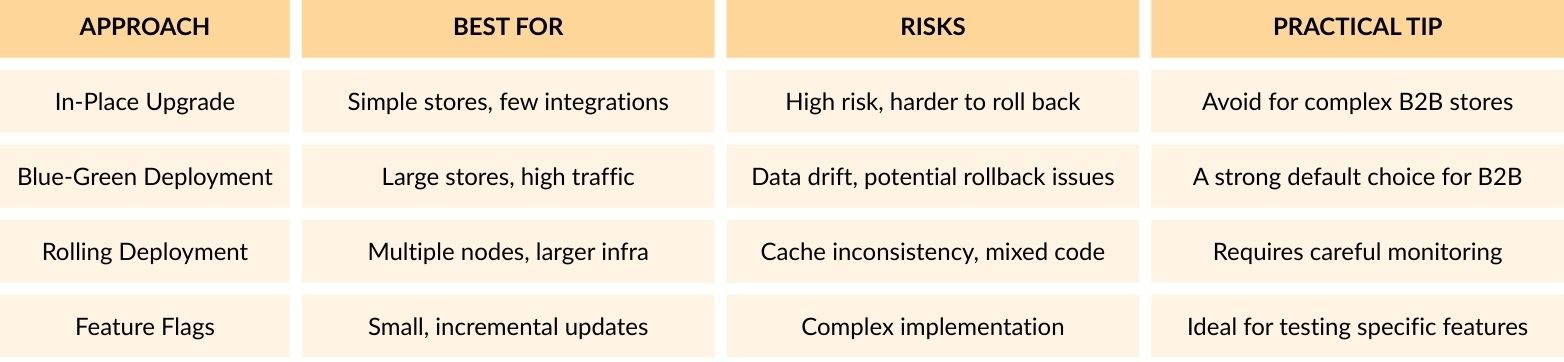
The blue-green deployment approach is typically the most effective for B2B stores as it reduces risk by having a “live” version running in parallel while you test the new version before switching all traffic over.
How Do You Protect B2B Pricing, Accounts, and Permissions During an Upgrade?
One of the most critical areas to protect during a B2B Magento store upgrade is the integrity of your customer accounts and their pricing. B2B stores rely on account-specific details such as negotiated pricing, product catalogs, and account permissions. If these are disrupted during the upgrade, customers will face difficulties accessing their products, seeing incorrect prices, or even placing orders.
Implement a B2B Parity Test
Before and after the upgrade, test critical customer touchpoints:
- Contract Pricing: Ensure that the correct prices are displayed across product pages, categories, and the shopping basket.
- Account Permissions: Test different user roles to ensure they can access the correct information and complete their tasks without issues (e.g., buyers, approvers, administrators).
- Quote Flow: Test quote requests, updates, and the conversion process from quote to order.
How Do You Upgrade Integrations and Extensions Without Breaking Orders?
For B2B Magento store upgrades, integrations with third-party systems such as ERP, CRM, PIM, payment gateways, and shipping systems are critical. These systems often handle tasks like stock updates, order placement, invoicing, and shipping. A disruption to any of these integrations during an upgrade can lead to broken orders and lost revenue.
Steps to Safeguard Integrations
1. Audit Integrations: Before upgrading, audit all integrations and ensure they are compatible with the new Magento version.
2. Test in Staging: Run test orders and transactions through all integration points in a staging environment to ensure they continue to function after the upgrade.
3. Use Data Replay: Implement data replay functionality for any missed transactions during the transition from the old to the new system.
If your store relies on asynchronous systems, like message queues or crons, ensure that they are well configured to handle the new version.
What Should You Test That Generic Upgrade Checklists Miss?
Most B2B Magento store upgrade checklists focus on basic functionality, like placing an order or viewing product pages. However, B2B stores often involve more complex workflows that require thorough testing beyond the basics.
Requisition Lists
Ensure that items added to requisition lists can be properly retrieved and ordered. Test if the process for adding, editing, and removing items functions smoothly.
Role-based Checkout
Test that each user role has the appropriate access to pricing, discounts, and order placement. Verify that the right prices and discounts are applied based on the user’s role, and check that checkout is only possible with the proper permissions.
Approval Flows
Confirm that quotes and orders go through the correct approval stages based on the role and account. Test how quotes are created, approved, and converted into orders, ensuring they follow the correct approval process.
Shipping Rules
Check that the correct shipping methods are available based on account preferences, delivery locations, and order sizes. Ensure that the store offers the appropriate shipping options depending on the customer’s profile and order details.
How Do You Protect SEO, Speed, and Tracking During a B2B Magento Store Upgrade?
A B2B Magento store upgrade can have a significant impact on your site’s SEO and performance if not properly managed. Changes to URLs, page structures, or internal linking can cause indexing issues, while speed and tracking disruptions can affect your conversion rates.
Focus on SEO Stability
- URL Structure: Ensure that the URL structure remains consistent, or implement proper redirects where necessary.
- Page Speed: Test Core Web Vitals and set performance budgets for key pages, such as product listings and checkout.
- Tracking: Validate that all conversion tracking, including quote requests, cart additions, and orders, continues to function correctly.
What Does a Safe Cutover Plan Look Like Step by Step?
The cutover is the critical moment when you transition from your old system to the new one. A well-planned cutover process ensures that your B2B Magento store upgrade happens smoothly and without significant downtime.
1. Freeze the Scope
Lock down any new feature development or changes in the final stages of the upgrade. This prevents unexpected additions that might introduce risks or delays. Ensure only critical bug fixes or adjustments are made during this phase.
2. Create a Release Candidate
Build and test the upgrade in a staging environment. This “release candidate” should include all the core changes, theme updates, and integration updates that you plan to apply to the live store. Test thoroughly for any issues related to functionality, compatibility, and performance.
3. Prepare Data Handling
Ensure that important data such as customer accounts, pricing, orders, and stock will sync correctly during the cutover. This includes preparing any data migration processes and ensuring that no data is lost or incorrectly updated when the transition happens.
4. Do a Rehearsal
Before performing the final cutover, test the steps in staging. This rehearsal should mimic the exact process that will be followed in production. Make any necessary adjustments to timing, procedures, and configurations to ensure a seamless transition.
5. Perform the Cutover
Switch the traffic to the new version of the store during a low-traffic window, if possible. Warm the caches to ensure that the store loads quickly for users, and validate the critical workflows such as pricing, checkout, and user logins are functioning correctly.
6. Monitor and Rollback if Needed
Monitor the system closely after the cutover to catch any issues early. If something critical breaks, have a rollback plan ready to revert to the previous version. Quick detection and response are key to maintaining customer confidence and store functionality.
What Should You Monitor in the First 72 Hours After Going Live?
Once the upgrade is live, the next step is monitoring. The first 72 hours are crucial to identify any issues that may not have been apparent during testing.
Monitoring Checklist
Commercial Metrics:
- Revenue, orders, and conversion rates by device
- Login success rate and customer complaints
- Quote requests and acceptance rates
Technical Metrics:
- Checkout error rates by payment method
- API error rates and message queue health
- Cron job performance and indexer status
Customer Service Metrics:
- Support ticket volume tagged with issues related to pricing, login, and checkout
- Any specific account complaints regarding pricing discrepancies
Conclusion
A B2B Magento store upgrade can be successfully carried out with minimal disruption to customers when it is planned and executed with care. Key strategies to ensure a smooth upgrade include protecting critical workflows, using a parallel deployment approach, thoroughly testing integrations, and ensuring SEO and tracking stability. By following the outlined best practices, you can confidently upgrade your B2B Magento store without losing customer trust or revenue.