
Magento innovation works best when you plan changes properly and roll them out in a controlled way. Most advice focuses on deployment tactics and general CI steps. That helps but it often misses the practical work that protects real stores like setting a clear risk level controlling who sees a new feature and checking results properly after launch.
This article gives you a simple way to keep improving your Magento store without breaking checkout, losing tracking or causing a sales drop you only notice later.
Table of Contents
What Does Magento Innovation Mean for a Live Store?
Magento innovation means making meaningful improvements to your store’s experience, performance, or operations while keeping revenue safe. It includes new features, UX changes, integrations, and performance work. The key is control with staged rollout, clear testing, and fast rollback routes so progress does not rely on luck.
When teams say “innovate”, they often mean one of these:
- Customer Experience: Better search, better navigation, faster checkout
- Trading Capability: Promos, bundles, subscriptions, multi store, B2B rules
- Operations: ERP, PIM, fulfilment logic, returns, customer service tools
- Performance and Stability: Core Web Vitals work, error reduction, uptime

A useful way to frame magento innovation is: What changes for the customer, and what changes for the business KPI you care about?
Why Do Magento Changes Break Things That Already Work?
Magento has lots of connected parts, so one change can affect something you did not touch. It often shows up only after the change hits real users, real orders, and live services. Here are the main reasons it happens.
Data Shape Drift
A new attribute, order field, or API payload reaches an ERP or WMS that still expects the old format. Orders can fail later in the process instead of during the deployment, which makes the issue harder to spot quickly.
Cache and Session Assumptions
A small frontend tweak can change cache behaviour or block output. That can affect personalisation, customer group pricing, cart rules, and session behaviour across key pages.
Checkout Third Party Dependencies
Checkout might look fine in staging, then fail in production due to real latency, rate limits, or stricter validation. Payment gateways, fraud tools, address lookup, and live shipping rates are common weak spots.
Indexing and Async Jobs
A change can appear fine until reindex, cron, or message queues run under load. That is when catalogue updates lag, prices display wrong, or orders stop syncing properly.
Analytics and Tag Drift
Theme changes and template edits can remove key events or break tracking. Revenue might stay steady, but your data becomes unreliable, and decisions get made on the wrong numbers.
That is why magento innovation needs technical control and business control working together.
How Do You Plan Magento Innovation Around Trading Risk?
Planning magento innovation around trading risk means you choose what can change, when it can change, and how you can undo it, based on revenue impact. You set “risk budgets” around peak periods, use a release calendar tied to campaigns, and agree KPI guardrails in advance so decisions are fast during launch.
A simple planning model that works in real teams:
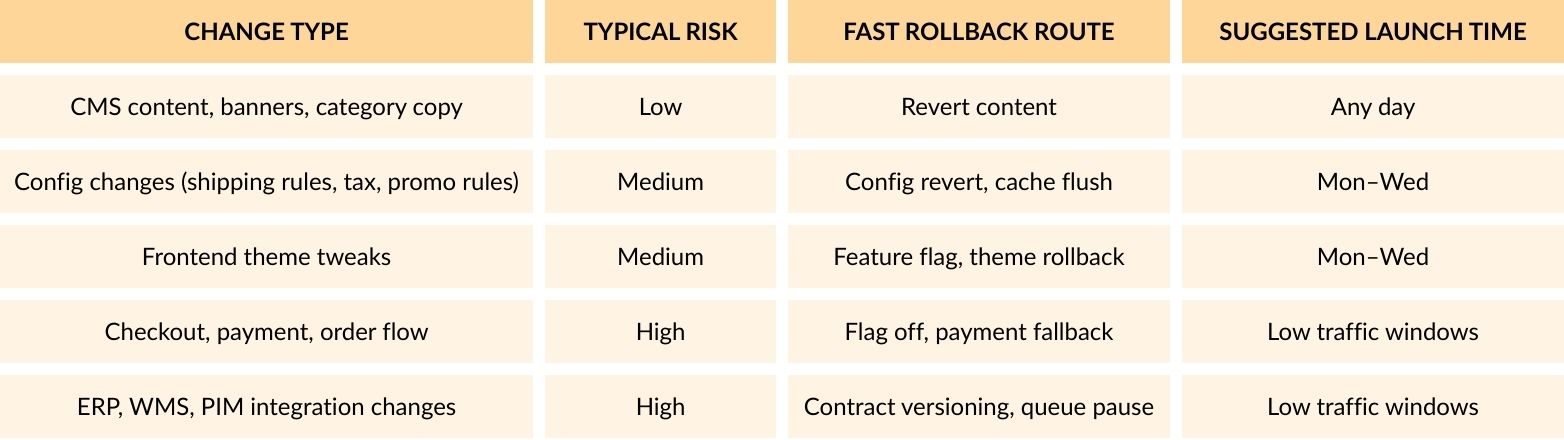
1) Classify the change using a risk lens
Use a quick table in tickets or your backlog:
2) Set guardrails that match trading reality
Pick 3–5 metrics that decide “continue or stop”:
- Checkout completion rate
- Payment success rate
- Add to cart rate
- Error rate on key endpoints
- Revenue per session (or conversion rate)
3) Agree a release decision flow
Keep it simple:
- Who can pause the rollout
- Who can turn a feature off
- Who watches metrics
- Who handles customer support messaging
This is where a support partner and development partner being aligned makes life easier, especially when you need quick action and clean comms.
What Is a Safe Release Process for Magento Innovation?
A safe release process helps you ship changes without causing issues on live. It follows the same steps every time so you can spot problems early and roll back fast if needed.
1. Define Done With Proof
Before the build starts, agree what success looks like and how you will prove it. Tie each ticket to one KPI and one place to check it, like logs, GA4, your payment dashboard, or error tracking. This keeps magento innovation focused on results and stops last minute debate.
2. Keep Staging Close to Live
Staging needs to behave like production or it will give you false confidence. Match key settings, services, and data setup as closely as you can. Use the same payment setup in test mode, the same shipping logic, the same cache rules, and the same third party connections where possible.
3. Run a Minimum Test Pack Every Time
Keep a short test pack that covers the money path and run it on every release. The goal is speed and consistency and not a giant checklist.
- Add to cart works
- Login works
- Checkout loads and completes
- Payment authorises and confirms
- Order email triggers
- Refund flow works if you use it in Magento
4. Build Static Content Before Deploy Where You Can
If your setup supports it, generate static content during the build step and not during the live deploy. This helps keep deployment time shorter and reduces the risk of slow pages right after release. It also makes the release process more repeatable which is what you want for steady magento innovation.
5. Warm Up Key Pages After Deploy
After deploying, warm up the pages that get hit first. This stops customers being the first to load cold caches.
Start with:
- Homepage
- Top category pages
- Best selling product pages
- Cart
- Checkout steps
Keep the list small and based on real traffic.
6. Release in Controlled Steps
Do not show new changes to everyone at once. Release in steps so you can watch key numbers and switch off fast if something drops. Use feature flags, store view rollouts, customer group testing, or a small traffic split. This gives you progress without putting revenue at risk.
How Do Feature Flags and Canary Rollouts Work on Magento?
Feature flags and canary rollouts work by separating deployment and release. Code can ship, yet only a selected group sees the feature. Rollout can expand based on metrics, then reverse fast if issues appear. Industry guidance notes that feature flags give strong targeting and quick rollback control compared with canary alone.
Magento gives you several practical ways to do this without huge platform changes:
Flag Options That Fit Magento Stores
- Admin config toggles for simple on and off control
- Store view or website scope to roll changes out by market
- Customer group targeting for B2B, VIP, or staff testing
- Percentage rollout using a feature flag tool when you need gradual release
- Route switching at server level for bigger platform changes
Non Obvious Insight Flags Need a Clean Exit Plan
Feature flags should not stay forever. If they pile up, they add risk and confusion. Give each flag an owner, set a clear end date, and book time to remove it once the change is stable.
How Do You Test Magento Innovation Without Slowing Delivery?
You do it by testing in layers. Start with quick checks that catch obvious breakages, then move into deeper tests only when the change touches money areas like checkout, pricing, promos, or integrations. The layers below keep testing fast but still cover the parts of Magento that cause the biggest problems.
1. Quick Automated Smoke Tests
- Homepage and category pages load
- Search returns results
- Product page add to cart works
- Mini cart updates
- Checkout step loads
2. Money Path Tests
- Guest checkout
- Logged in checkout
- Payment authorisation and capture
- Order confirmation email triggers
- Refund flow if you handle refunds in Magento
3. Contract Tests for Integrations
Contract tests check payload shape, required fields, and status rules for ERP, WMS, PIM, fraud, and shipping services. They catch breakage before live orders start stacking up in queues or failing in the background.
4. Performance Regression Checks
If you touch the frontend or catalogue, run a basic performance check. Treat it like a gate you run each time, not a once a year audit. If scores drop after a change, you catch it early and fix it while the work is still fresh.
If your platform resources are tight, it’s also worth reviewing system requirements and hosting headroom before big releases, especially around peak trading.
How Do You Monitor Magento Innovation After Launch?
After launch, the goal is to spot issues early and act fast. That means setting up a few simple checks that tell you if customers can still browse, add to cart, and pay without problems. The areas below cover the most common warning signs and make it clear when to pause or roll back.
Add a Deploy Marker in Your Monitoring
Mark the exact time of release in your APM or monitoring tool. It makes it easier to compare before and after and spot patterns tied to the change.
Set Alerts for Checkout and Payment Errors
Create alerts for error spikes on checkout steps and payment callbacks. These are usually the first signs that something has gone wrong.
Use Revenue Guardrails for Sudden Drops
Track conversion and revenue trends in short windows, like hourly checks. If numbers drop fast, you want to catch it the same day, not next week.
Watch Support for Repeat Complaints
Keep an eye on support tickets and live chat. A sudden wave of “can’t pay” or “can’t place order” is often a faster signal than dashboards.
Recheck Analytics Events After Release
Confirm key events are still firing after changes to theme or templates. If tracking breaks, you lose the data you need to judge if the release worked.
How Do You Keep Extensions and Upgrades Compatible While Innovating?
Keeping extensions and upgrades stable during magento innovation comes down to control and routine. The more custom changes and add ons you have, the easier it is for one update to cause a conflict. Upgrades also bring database and API changes that can break things in ways you only notice once orders start flowing. A repeatable process beats a big one off sprint every time.
A Practical Routine That Works
- Keep an up to date list of extensions that touch checkout, pricing, tax, shipping, and catalogue
- Group changes by risk and update one cluster at a time, then run your money path tests
- Avoid heavy overrides in themes and core files, use clean extension methods where possible
- Treat database changes as high risk and plan them for low traffic windows
- Track what changed and why so you can trace issues fast after release
A Practical Checklist You Can Reuse for Every Release
Pre Build
- KPI target agreed
- Rollback route agreed (flag off, config revert, deploy rollback)
- Owner assigned for launch window
Build and Test
- Money path suite passes
- Integration contract tests pass (if relevant)
- Analytics event spot check done
- Performance regression check done (if relevant)
Deploy
- Staging mirrors production config as close as possible
- Cache warm up plan ready
- Deploy marker added in APM
Release
- Start small (staff, customer group, market, 5% traffic)
- Monitor guardrails each step
- Remove or schedule removal of temporary flags
Conclusion
Magento innovation stays safe when you follow a clear routine on every release.
- Plan the change around trading risk and set KPI guardrails
- Release in small steps with a fast rollback option
- Test in layers so money paths stay protected
- Monitor checkout, payment, revenue, and tracking right after launch
- Keep extensions and upgrades tidy with one risk group at a time
Use this approach and you can keep improving your Magento store without breaking what already works.