
Magento plan problems often start small. Pages load slowly, checkout drops happen, tracking looks unreliable, and the backlog grows. Over time, those issues affect paid performance, reduce organic visibility, and make every release feel risky.
This article sets out a 12-month magento plan for stores that are not meeting their potential. It follows a clear month-by-month approach that fits real trading pressures, limited development time, and the day-to-day needs of marketing, operations, and the platform.
What Is A Magento Plan For An Underperforming Store?
A magento plan is a 12-month, KPI-led roadmap designed to turn a store around in a structured way. It starts by fixing the issues that cause lost revenue, like checkout errors, slow pages, tracking gaps, and unstable releases. Once the store is steady, the focus shifts to improving conversion and bringing in higher quality traffic through SEO, paid, retention and reliable Magento extensions. The final phase is about scaling growth without adding risk back into the system.
A good magento plan also defines how work gets prioritised and proved. Each task links to one key metric, a clear owner, and a source of evidence such as GA4, Search Console, server logs, or a payment dashboard.

It is built around your trading calendar, so major changes avoid peak weeks and the team still has capacity for urgent fixes when they happen.
Why Underperforming Magento Stores Usually Fail To Recover
Recovery tends to stall when teams are busy but progress is hard to prove. The store keeps moving between quick fixes and bigger projects, and the work does not stack into clear trading gains. These are the blockers that usually sit underneath the surface issues.
1. No Clean Baseline
Without a reliable baseline, it is difficult to say what improved and why. Tracking gaps, inconsistent reporting, and unclear attribution lead to decisions based on gut feel. That often means effort goes into the wrong fixes, or wins get missed because nobody can prove them.
2. Backlog Without A Value Score
When tickets are prioritised by noise, the backlog grows but outcomes stay flat. Teams jump between tasks without a shared view of impact, effort, and risk. That creates a lot of activity, but little momentum, because the work is not tied to the numbers that matter.
3. Trading Calendar Blindness
If the plan does not fit the trading calendar, it gets paused for campaigns, peak weeks, and promotions. Then it restarts in a rush, or not at all. Over time, this creates a pattern where the store is always preparing to improve but never actually improves.
4. Extension Sprawl
Too many modules, unclear ownership, and overlapping features increase the chance of bugs and slowdowns. Every release becomes harder to test and more likely to cause side effects. That reduces confidence, which slows delivery and makes teams avoid change.
5. Ops Friction Being Missed
Many conversion issues are caused by operational problems that show up on the site. Stock accuracy, fulfilment speed, delivery rules, returns handling, and product data quality can all reduce trust and increase drop-off. If these are treated as separate to the platform, the store can look fine technically but still underperform.
This is why a strong magento plan focuses on sequence and proof. It prioritises the work that protects revenue first, then builds improvements that can be measured and maintained.
The Three-Lane Framework That Keeps A Magento Plan On Track
A magento plan works best when you split the work into three lanes that run at the same time. This keeps progress steady. It also stops urgent fixes taking over the whole roadmap.
Lane 1: Stabilise And Protect Revenue
This lane covers the work that prevents lost sales and reduces risk.
- Checkout reliability and payment issues
- Error rates and failed journeys
- Page speed targets and performance checks
- Release process and testing basics
- Security patching and monitoring
Lane 2: Improve And Help Traffic Convert
This lane focuses on making it easier for customers to find products and complete a purchase.
- Category and product page improvements
- Navigation and site search tuning
- Trust signals like delivery and returns details
- Mobile issues that cause drop-off
- Checkout steps and form friction
Lane 3: Grow And Bring In Better Traffic
This lane builds stronger demand and improves traffic quality over time.
- Technical SEO fixes and site structure
- Category strategy and landing pages
- Content that supports buying decisions
- Product feed quality for Shopping and PMax
- Paid efficiency and audience targeting
- Email flows and retention
If the store is already unstable, set aside time each week for support and fixes so urgent issues do not push planned work out.
Month-By-Month: A 12-Month Turnaround Magento Plan
What Should A 12-Month Magento Plan Include?
A 12-month magento plan should include three things per month: (1) a small set of deliverables, (2) the KPI each deliverable should move, and (3) the proof source (GA4, Search Console, server logs, payment provider, Merchant Center, support desk). That keeps the plan honest and easy to report.
Below is a real-world structure that works for most underperforming stores.
Tip Before You Start: Put a 15–20% incident buffer into capacity every month. Without it, one messy release wipes out your roadmap.
12-Month Roadmap Table (High Level)
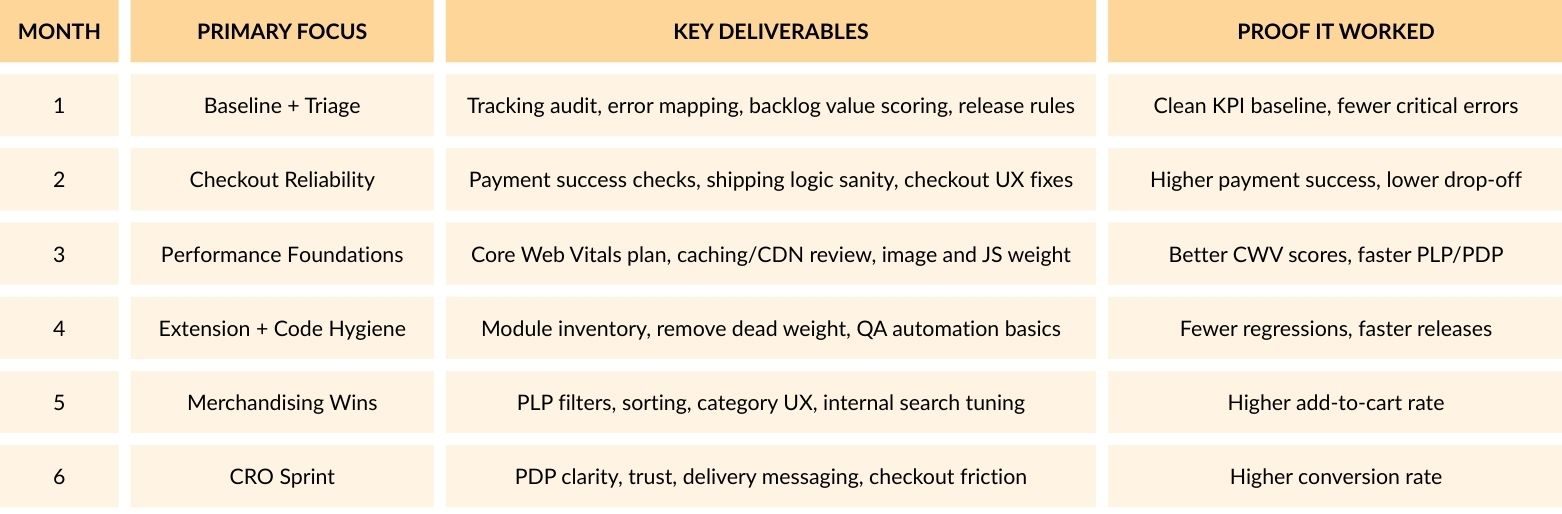
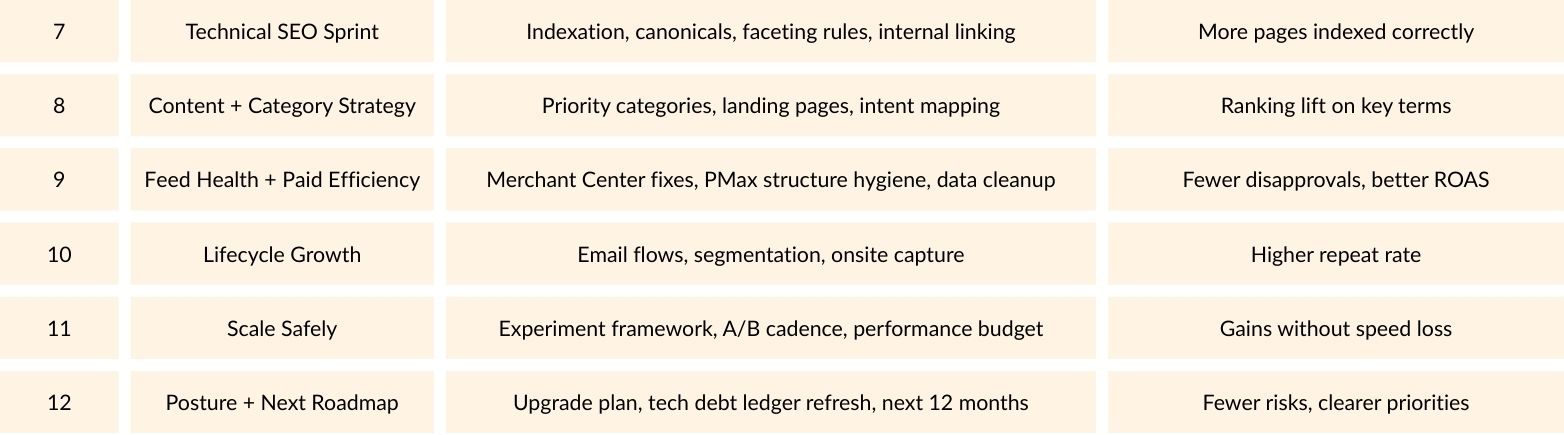
Now let’s break the months down in a way you can actually run with.
Month 1: Set The Baseline And Stop Guessing
Goal:
Know what is broken, what matters, and what to ignore.
Do This:
- Measurement reality check: Confirm GA4 purchase events, revenue, refunds, and key funnel steps are correct.
- Revenue leak map: List top 10 pages by sessions and revenue, then note speed, bounce, and exit.
- Incident review: Pull the last 90 days of bugs and outages. Group by theme: checkout, search, performance, admin, integrations.
- Backlog scoring: Give each ticket a simple score: Impact (1–5) x Confidence (1–5) x Effort (1–5 inverse).
Practical Example:
If your paid team says “Meta is fine but sales are down”, month 1 often reveals the real issue: a payment method failing on mobile, or shipping rules blocking certain postcodes, or duplicate tracking creating misleading reports.
Month 2: Fix Checkout Reliability Before You Chase Growth
Goal:
Ensure a seamless and reliable checkout experience before scaling.
Do This:
- Audit payment success rates by device, browser, and payment method.
- Check tax and shipping edge cases: Free shipping thresholds, bulky items, delivery zones.
- Remove friction: Guest checkout clarity, form validation, address lookup behaviour, wallet options placement.
- Add monitoring: Alerts for checkout error spikes and payment declines.
Response time and support workflows are essential for maintaining a smooth checkout process, ensuring quick resolutions to issues and preventing friction that can lead to lost sales.
Month 3: Build A Performance Plan That Holds Up Under Trading Pressure
What Core Web Vitals Targets Should A Magento Plan Aim For?
Aim for LCP within 2.5 seconds, CLS under 0.1, and INP under 200 ms on key templates like home, category, product, cart, and checkout. These targets give you clear performance guardrails so speed work stays consistent, not reactive, and improvements do not vanish after the next campaign push.
Do This:
- Pick 5 “money pages” per template and treat them as your performance test set.
- Reduce weight first: Images, third-party scripts, tag bloat.
- Review caching and CDN setup, then confirm full page cache behaviour on PLPs and PDPs.
- Add a performance budget to releases (page weight and key metrics).
Month 4: Reduce Regression Risk By Sorting Out The Messy Bits
Goal:
Changes stop breaking other things.
Do This:
- Create a module inventory: what it does, owner, renewal cost, risk level.
- Remove or replace dead extensions.
- Formalise QA: Smoke tests for add-to-cart, checkout, account, search, and admin order flow.
- Tighten release rules: smaller releases, clear rollback plan, staging parity.
This is also where teams get serious about prioritisation. Scaling Adobe Commerce becomes challenging when every feature feels urgent, as prioritisation is key to ensuring long-term improvements aren’t overshadowed by immediate demands. If everything feels urgent, the store never improves properly.
Month 5: Win Back Conversion With Merchandising Basics
Goal:
Make it easier to find and choose products.
Do This:
- Fix filters and sorting so they match how customers shop, not how the catalogue is organised.
- Improve on-site search: Synonyms, zero-results handling, boosted products.
- Add clarity on category pages: Delivery messaging, returns, trust, sizing guides, key USPs.
Month 6: Run A Focused CRO Sprint
What CRO Work Belongs Inside A Magento Plan?
CRO work inside a magento plan should focus on removing buying friction and improving product confidence. That normally means PDP clarity around delivery, returns, reviews, and product details, plus reducing checkout confusion. Done in short sprints, CRO gives measurable wins without a big rebuild.
Quick-Win Examples We See Move Revenue Fast:
- Delivery date messaging placed near price.
- Clear returns policy snippet near the add-to-cart button.
- Cleaner size guidance and “what’s included” blocks.
- Fewer distractions during checkout.
Month 7: Technical SEO Sprint (The Stuff That Quietly Kills Rankings)
Goal:
Remove technical blockers so content can actually rank.
Do This:
- Indexation review in Search Console: Spikes, drops, excluded pages, duplicate issues.
- Faceted navigation rules: Prevent crawl traps and thin duplication.
- Canonicals and pagination checks.
- Internal linking improvements on categories and product families.
When you’re ready to push organic growth properly, align this work with a broader SEO service approach.
Month 8: Category And Content Strategy That Supports Revenue, Not Vanity Traffic
Goal:
Build pages that attract buyers, not browsers.
Do This:
- Map your top categories to search intent: “shop” terms, “compare” terms, “fix” terms, “compatibility” terms.
- Build a short list of “hero categories” to improve first.
- Create supporting content that answers pre-purchase questions and links into categories.
Month 9: Feed Health And Paid Efficiency
Why Does Merchant Center Belong In A Magento Plan?
Merchant Center issues can quietly throttle Shopping and Performance Max by disapproving products or limiting visibility. A turnaround plan should include feed quality checks, because ads cannot scale properly if product data is inaccurate, inconsistent, or missing key attributes.
Do This:
- Fix key attributes: Price, availability, identifiers, shipping settings.
- Clean shipping data and rules so it matches site reality, including delivery zones and thresholds.
- Reduce variant chaos and duplicate product grouping issues.
Month 10: Lifecycle Growth (Make Your First-Time Buyers Come Back)
Goal:
Improve repeat purchase rate and margin.
Do This:
- Build or fix flows: Browse abandon, cart abandon, post-purchase, replenishment, win-back.
- Segment by margin, category, and first purchase type.
- Improve onsite capture without annoying pop-ups.
Month 11: Scale Changes Safely With An Experimentation Rhythm
Goal:
Keep improving without breaking performance or trading.
Do This:
- One test at a time on key templates.
- Keep a changelog tied to KPIs.
- Enforce the performance budget you set in month 3.
Month 12: Upgrade Posture And Next-Year Roadmap
How Should Upgrades Fit Into A 12-Month Magento Plan?
Upgrades work best as a planned stream, not a panic project. Build upgrade readiness into the year so it never becomes a fire drill, and keep a live list of upgrade risks tied to modules, integrations, and custom code. That way, you protect trading stability while still moving forward.
Do This:
- Refresh your module inventory and mark upgrade risks.
- Create a tech debt ledger that stays alive, not a one-off audit doc.
- Plan the next 12 months based on what actually moved KPIs.
What To Measure Each Month So You Know It’s Working
Commercial KPIs
- Conversion rate (overall and by device)
- Revenue per session
- AOV and margin contribution
- Repeat purchase rate
Reliability KPIs
- Payment success rate
- Checkout error rate
- Site error rate (500s, failed API calls)
Performance KPIs
- Core Web Vitals on money templates
- PLP and PDP load times in real-user data
Acquisition KPIs
- Organic clicks and revenue (not only rankings)
- Shopping disapprovals and feed warnings
- Paid efficiency (ROAS or MER depending on your model)
Common Traps That Derail A Turnaround
Trap 1: Chasing A Redesign Too Early
A redesign can look like progress, but it often delays the work that protects revenue. If checkout is unstable, tracking is unreliable, or key pages are slow, a new design will not fix the core problems. Start with the buying path, then improve layouts and visuals once the store is steady.
Trap 2: Letting Urgent Tickets Take All Capacity
Urgent issues will always exist, especially in a busy store. The problem is when they take all available time and nothing planned gets shipped. Protect roadmap time every sprint, even if it is only a day or two. Without that, the store stays stuck in a cycle of firefighting.
Trap 3: Measuring Only Sessions And Rankings
Traffic and rankings can move for reasons that have nothing to do with store health. If you do not track revenue impact, you can spend months improving the wrong things. Balance acquisition metrics with trading metrics like conversion rate, revenue per session, add to basket rate, and payment success rate.
Trap 4: Keeping Risky Modules Just In Case
Old extensions and unused features add weight and increase the chance of bugs. They also make upgrades harder and testing slower. If a module is not clearly needed and owned, it becomes a risk. Keep a simple inventory, review it often, and remove what no longer supports trading.
Trap 5: Ignoring Operational Reality
Many conversion issues are not caused by design or traffic. They come from delivery times, stock accuracy, returns handling, and unclear policies. If customers cannot trust availability or delivery, they do not buy. Make sure the site reflects real fulfilment rules, clear delivery expectations, and simple returns messaging.
When To Consider A Rebuild Or Replatform
You do not need a rebuild just because the site feels slow or the store is under pressure. In many cases, a structured magento plan will improve performance, stability, and conversion without starting again. A rebuild or replatform is worth considering when the current setup keeps blocking progress, even after the key issues have been worked through.
Here are the signs.
- Upgrades keep getting pushed back
- Releases are not safe
- Integrations cause repeated trading problems
- Core trading features rely on workarounds
- Performance improvements do not stick
- Total cost stays high without clear gains
A strong magento plan helps you make this decision with evidence. You can see what has improved, what still breaks, what takes the most time to maintain, and where risk is coming from. That makes the next step clearer and easier to agree across marketing, operations, and development.

Conclusion
A 12-month Magento plan is crucial for underperforming stores, concentrating on stabilisation, system reliability, and growth. The roadmap targets key areas such as checkout performance, page speed, and SEO, with prioritised tasks that protect revenue. Regular KPI monitoring tracks progress, reduces technical debt, and enhances conversion rates. Following this structured approach enables stores to achieve consistent growth and optimise resources effectively.