

Good news! The Hyvä Theme is now free and open source for Magento 2 stores. This modern frontend is built to streamline the setup of online stores, making it easier to manage layouts, customise features, and keep everything running smoothly. Many merchants appreciate the cleaner, lighter code and the faster experience it offers for both customers and developers. This guide covers how the theme works, the benefits it offers, and clear steps to get it set up in your store.
Table of Contents
What is the Hyva Theme?
The Hyvä Theme is a modern frontend for Magento 2 stores. It is designed to make websites faster, easier to use, and simpler to manage than the default Magento theme. Stores that switch to Hyvä often notice quicker page loads, smoother performance, and a more responsive browsing experience for their customers. The theme also makes it easier for developers to update layouts, add features, or change the design without having to deal with heavy, complicated code.

In addition to improving speed and usability, Hyvä helps reduce the overall complexity of a Magento store’s frontend, making maintenance and future updates much more straightforward. This combination of performance, simplicity, and developer-friendly design makes Hyvä a modern and practical choice for Magento 2 stores looking to improve their site.
The Advantages Uncovered by Going Open Source
With the Hyvä Theme now available as an open‑source solution, several clear advantages come with this change:
Cost transparency and accessibility
Hyvä was previously available under a commercial licence, which meant upfront costs for stores and developers. The open-source release makes the code more accessible, allowing teams to experiment, customise, and implement the theme without significant licensing fees.
Community contributions and ecosystem growth
Open-source development encourages more developers to contribute, creating a growing library of compatible extensions and faster innovation. This collaborative environment helps the theme evolve more quickly and adapt to new Magento updates and industry trends.
Improved performance
The theme’s lightweight design and reduced resource load translate into faster pages and lower server demands. For example, pages can drop from 3 MB with 230 requests to 0.4 MB and just 5 requests. These performance gains can improve Google Core Web Vitals scores, enhance user experience, and potentially increase conversions.
Lower risk for experimentation
With open access, testing and upgrading your frontend becomes less costly and more flexible. Teams can explore Hyvä’s modern architecture and improved performance without committing to a large initial investment or complex licensing agreements.
How the Hyva Theme Works
Implementing the Hyvä Theme in your Magento store is straightforward when you follow a clear process. Here’s a detailed guide to help you transition smoothly and take full advantage of the theme’s performance and customisation benefits.
1. Check Compatibility
Before installation, confirm that your store environment supports the Hyvä Theme:
- Magento version: Hyvä works with Magento 2.4.x versions. Check your current version to avoid conflicts.
- Server requirements: Make sure your hosting environment meets the necessary PHP version and other dependencies.
- Development tools: Hyvä uses TailwindCSS, which requires Node.js for compiling styles. Ensure your development environment is set up correctly.
2. Install via Composer
Composer is the recommended method to install Hyvä and its dependencies:
- Run the command:
composer require hyva-themes/magento2-default-theme
- This downloads the core theme files and required libraries.
- Composer ensures that updates and dependencies are managed efficiently.
3. Activate the Theme
After installation, set Hyvä as the active theme in Magento:
- Go to Magento Admin > Content > Design > Configuration.
- Select your store view and choose hyva/default as the applied theme.
- Save the configuration and flush the cache to make the theme active.
4. Adjust Configuration
Hyvä has recommended configuration adjustments to ensure optimal performance:
- Disable Magento bundling and minification: These built-in features can interfere with Hyvä’s lightweight frontend.
- Enable GraphQL modules: Hyvä relies on Magento GraphQL for dynamic data fetching, so make sure all required modules are active.
- Check third-party module compatibility: Some modules may need adjustments to work smoothly with Hyvä.
5. Test Performance
Measure how the theme affects site speed and responsiveness before going live:
- Use PageSpeed Insights to check loading times and overall performance.
- Lighthouse and Web Vitals provide insights into metrics such as Largest Contentful Paint, Cumulative Layout Shift, and First Input Delay.
- Compare results to your previous frontend to verify improvements.
6. Migrate or Rebuild Frontend Customisations
If your store has custom layouts, templates, or scripts built on older Magento frameworks (like RequireJS or jQuery), you may need to:
- Rebuild templates using TailwindCSS for styling and AlpineJS for interactivity.
- Adjust JavaScript customisations that relied on legacy Magento structures.
- Test custom modules and extensions for compatibility with the new theme.
7. Launch and Monitor
Once testing is complete, deploy Hyvä to your live store:
- Choose a low-traffic period for the launch to minimise disruption.
- Monitor page speed, user engagement, and conversions to ensure the theme delivers the expected benefits.
- Keep an eye on error logs and third-party modules to catch any issues early.
What Are the Benefits of Using the Hyva Theme?
Here’s a breakdown of the main advantages (and supported by data/examples) for business owners:
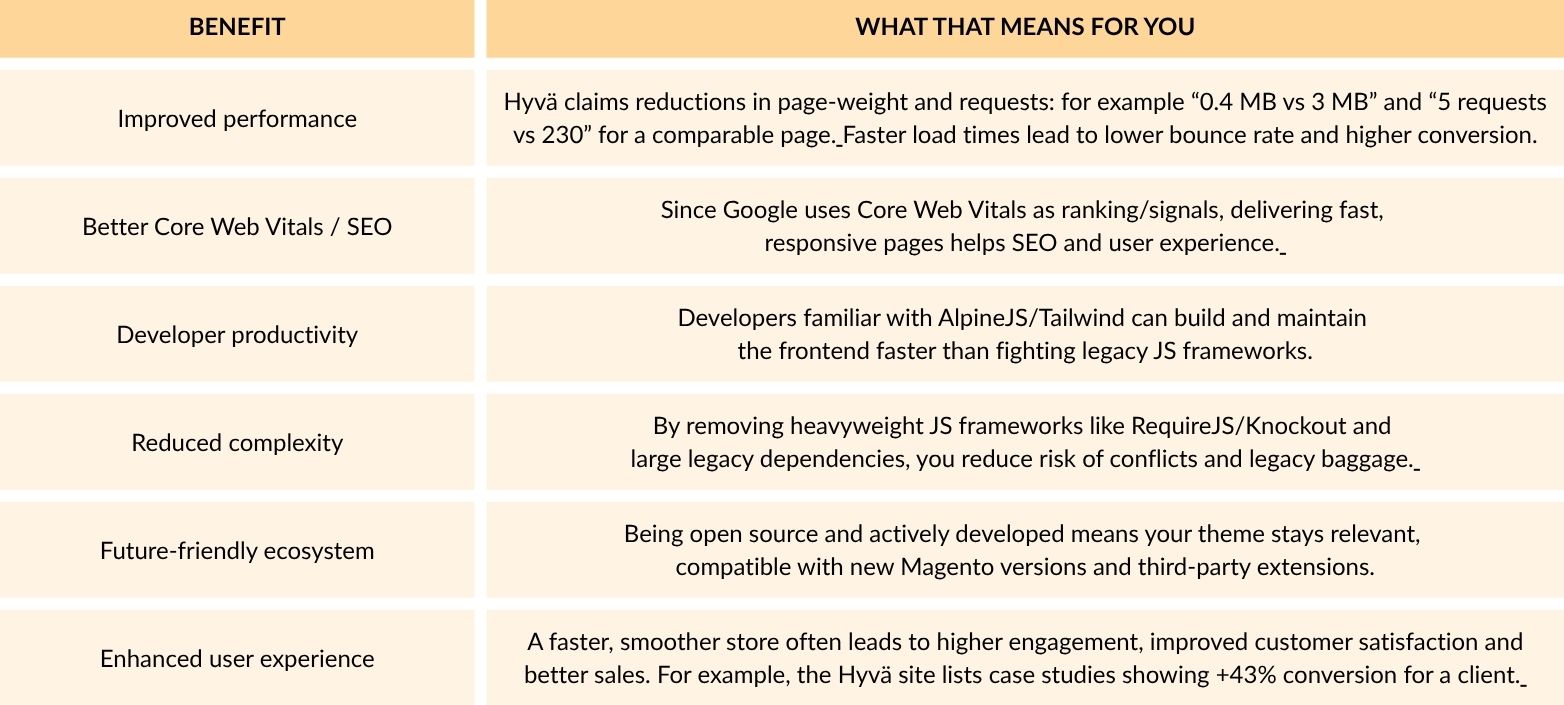
In simple terms, switching to the Hyvä Theme can result in faster page loads, improved SEO, a smoother user experience, and potentially higher revenue, which is a clear advantage for any online store.
What to Watch Out For and Limitations
Here are some important points to consider when evaluating the Hyvä Theme:
Module Compatibility
Some older Magento extensions rely on front-end structures such as JavaScript or templates that Hyvä replaces. Migrating to Hyvä may require reviewing, rebuilding, or finding Hyvä-compatible alternatives for these custom modules.
Checkout Customisation Options
If your store uses highly customised checkout flows, ensure your payment and shipping extensions are compatible with the Hyvä ecosystem. Some reviews highlight this as a common challenge.
Upfront Migration Effort
Stores with large inventories, multiple custom design elements, or non-standard modules will need careful planning and resources to migrate successfully to Hyvä.
Learning Curve
Although AlpineJS and TailwindCSS are generally simpler than older frontend stacks, your team may require training or extra time to adapt if they are used to legacy Magento frontends.
Ongoing Magento Core Upgrades and Hosting Requirements
Switching to Hyvä does not remove the need for secure, up-to-date Magento installations, good hosting, and ongoing optimisation practices.
Careful consideration of these factors will help ensure the Hyvä Theme delivers optimal performance, speed, and a smooth user experience without unexpected issues.
How to Migrate to the Hyva Theme
Here is a clear step‑by‑step guide you can follow for migration, tailored for an e‑commerce retailer.
1. Audit current setup
- Identify current Magento version, theme in use, custom modules, payment/shipping integrations.
- Record current performance metrics (page load time, bounce rate, conversions) so you can measure before vs after.
- List all front‑end customisations: CSS, JS, templates, third‑party modules.
2. Select staging environment
- Create a separate staging clone of your live site.
- Install Hyvä Theme there and test without disrupting live store.
3. Install Hyvä Theme
- Follow the Composer install instructions (see section 3).
- Activate the theme and flush caches.
- Disable Magento built‑in minification/bundling as recommended.
4. Adapt custom modules and templates
- Check third‑party extensions for compatibility with Hyvä.
- Redesign any templates using TailwindCSS/AlpineJS if required.
- Test key flows: product pages, category pages, checkout, payment, shipping.
5. Measure performance
- Run tools like PageSpeed Insights, Lighthouse and compare to your baseline metrics.
- Check Core Web Vitals (Largest Contentful Paint, Cumulative Layout Shift, etc).
- Monitor user behaviour: bounce rate, conversion rate, engagement.
6. Launch & monitor
- Once satisfied, push changes to the live store (preferably during a low‑traffic window).
- Monitor analytics for the first 7‑30 days: watch for any drop in conversion, load errors, module conflicts.
- Plan for regular updates: since Hyvä is open source, you’ll want to keep it up‑to‑date to gain performance/security benefits.
7. Optimise continuously
- Even with Hyvä, you should still optimise images, lazy‑load, implement Content Delivery Network (CDN), and ensure hosting is good.
- Use the theme’s advantages: fewer JS requests means faster rendering, so take advantage by running clean code and minimising heavy scripts.
Hyva Theme vs Other Frontend Solutions
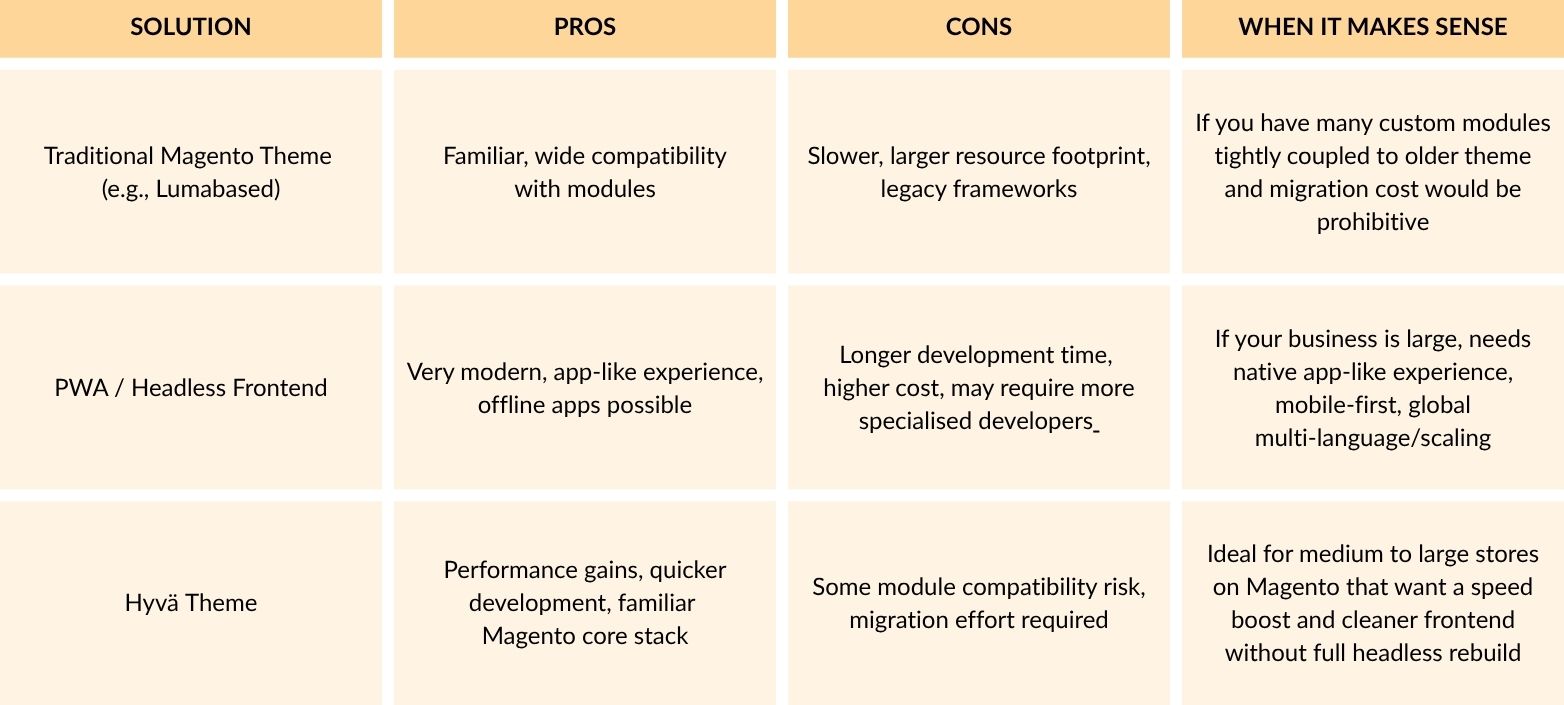
Here’s how the Hyvä Theme stacks up compared with other common frontend approaches for Magento:
Practical Tips for E‑Commerce Business Owners
Here are some practical tips to help you get the most out of the Hyvä Theme and ensure a smooth transition:
1. Start Small
If your store has many custom pages or modules, consider migrating a single store view or a smaller region first. Testing on a limited scope allows you to measure results, identify potential issues, and refine the process before rolling out the theme across your entire site.
2. Measure Pre-Migration Metrics
Collect key performance data such as page speed, bounce rate, conversion rate, and average order value before migration. Having these benchmarks makes it easier to evaluate the impact of Hyvä after implementation.
3. Focus on Mobile First
Hyvä’s performance improvements are especially noticeable on mobile devices. Prioritise mobile optimisation during migration to ensure a fast, smooth user experience for the majority of shoppers who browse and buy on smartphones or tablets.
4. Check Third-Party Extension Compatibility
Some payment gateways, shipping modules, and other extensions may require Hyvä-compatible versions. Review all critical extensions in advance and account for any updates or adjustments in your budget and timeline.
5. Communicate with Your Development Team
Make sure your developers or agency team are familiar with TailwindCSS and AlpineJS, the main technologies Hyvä uses. Proper preparation ensures smoother customisation and fewer integration issues.
6. Use Internal Link-Building
Use internal links to enhance site navigation and SEO. For example, linking to 5ms.co.uk’s Magento services page with anchor text like “modern Magento solutions at 5MS” can help guide visitors to relevant resources while improving user experience and supporting search visibility.
7. Post-Migration Performance Monitoring
After migration, monitor user behaviour, rankings, and traffic using Google Analytics and Search Console. Track metrics such as page speed, bounce rate, and conversion rate to ensure the Hyvä Theme is delivering the expected improvements.
8. Plan for Future Upgrades
Even with Hyvä being open-source, it’s important to stay on top of theme updates and Magento core upgrades. Regular updates help maintain performance, security, and compatibility with new extensions or tools.
Conclusion
The Hyvä Theme gives Magento 2 stores a faster, lighter, and easier-to-manage frontend. Pages load quickly, SEO benefits improve, and visitors have a smoother experience overall. Following clear steps for migration and checking extension compatibility helps reduce problems and ensures the theme works well with your store setup. Regular monitoring after migration keeps performance steady, and taking advantage of Hyvä’s simple, modern stack can make ongoing updates easier. Overall, the theme provides clear performance improvements and a better shopping experience without complicated setups or high costs.