
Magento is one of the most trusted platforms for building and managing online stores, known for its flexibility and strong features. Still, even the best platform can slow down when certain areas are overlooked. Many store owners start to notice longer loading times, higher bounce rates, and fewer sales without realising what’s causing it. This Magento guide explores the most common performance issues that affect your store and explains how to fix them with simple, practical steps.
Why This Magento Guide Matters for Your Store’s Performance
This Magento guide gives you a clear and practical way to find and fix the main performance problems that slow down Magento stores. Performance affects more than just how fast your site feels. Even a one-second delay can lower conversions by about 7%.
Research from Google shows that faster sites lead to better engagement and stronger rankings in search results. Since Google now includes speed and Core Web Vitals in its ranking system, poor performance can affect both your user experience and search visibility.

Top performance issues in Magento stores
Below are some of the most common problems that can slow down a Magento store. Each one explains what causes the issue and how it affects your site’s overall performance.
1. Slow server response and hosting problems
Answer:
If your server doesn’t have enough resources or is mis-configured, Magento will respond slowly even before page assets load.
Common causes:
Shared hosting with low CPU/RAM, old HDD instead of SSD, server far from your customer base, missing caching layers.
2. Unoptimised front-end assets (CSS/JS/images)
Answer:
Large images, excessive scripts and unminified assets make your store heavy and slow to render.
Common causes:
3. Extension and theme overload
Answer:
Every extension or heavy theme feature can add overhead and slow down your store’s performance.
Common causes:
4. Database inefficiencies and caching mis-configuration
Answer:
If your database queries are slow, or your caching layer is mis-configured or disabled, Magento can struggle under load.
Common causes:
No full page cache, missing Redis/Varnish setup, bloated log tables, non-indexed database columns.
5. Poor mobile performance
Answer:
With most traffic now from mobile devices, a store that loads slowly on mobile will lose visitors and rank poorly.
Common causes:
How to fix each issue (Step by step)
This section is your practical checklist. For every common problem it gives clear, ordered actions you can take right away, the expected result, and one quick test to confirm the issue is resolved. Use it to methodically improve speed and reliability in your store.
1. Improve your hosting & server environment
- Move to Magento-friendly hosting: SSD storage, enough RAM/CPU for your SKU volume and traffic.
- Use a Content Delivery Network (CDN) to deliver static assets from locations close to users.
- Choose a server location close to your primary market (UK/EU if you’re UK based).
- Ensure you’re running in production mode, not developer mode in Magento.
- Set up full-page caching (e.g., Varnish) and Redis for sessions and cache.
- Monitor Time To First Byte (TTFB), aim for < 0.5 seconds.
By tackling these you respond quicker to user requests, leading to better UX and lower bounce-rates.
2. Optimise front-end resources
- Compress images and convert to modern formats such as WebP where possible.
- Lazy-load below-the-fold images.
- Minify and merge CSS/JS files; remove unnecessary plugins/widgets.
- Remove unused CSS.
- Use “async” or “defer” attributes for non-critical JavaScript.
- Reduce the number of HTTP requests; bundle files where feasible.
- Use browser caching headers for static files.
These steps reduce page weight and improve rendering speed, making the store feel quicker and more responsive.
3. Review and clean up themes / extensions
- Audit installed extensions: remove any that are unused or duplicate features.
- Use a lightweight, optimised theme designed for Magento 2 (or newer version).
- Ensure custom code is following Magento best practices (avoid heavy loops, redundant queries).
- Disable modules you don’t need; check for conflicts between modules.
- Keep Magento’s core, theme and extensions up to date since updates often include performance enhancements.
This reduces overhead and ensures your store is lean and efficient.
4. Tune database, caching and configuration
- Enable full-page cache and configure properly.
- Use Redis/Memcached for caching layers.
- Clean up log tables and session data to avoid bloated database tables slowing queries.
- Ensure indexes are up to date; enable flat catalogue where appropriate.
- If you have high traffic, consider database clustering or sharding.
- Monitor query performance since slow queries on large catalogues can be a hidden drag.
A well-tuned back-end means the front-end has less latency to contend with.
5. Mobile performance optimisation
- Simplify your mobile theme: fewer animations, lighter assets.
- Ensure your store passes Core Web Vitals (Largest Contentful Paint, First Input Delay, Cumulative Layout Shift).
- Use HTTP/2 or HTTP/3 and Brotli compression for faster network performance.
- Ensure your checkout and navigation are mobile-friendly and fast.
- Test on real mobile networks and devices because what feels fast on desktop can still be slow on mobile.
With mobile traffic dominating, getting this right is non-negotiable for conversion and SEO.
Prioritisation table: What to tackle first
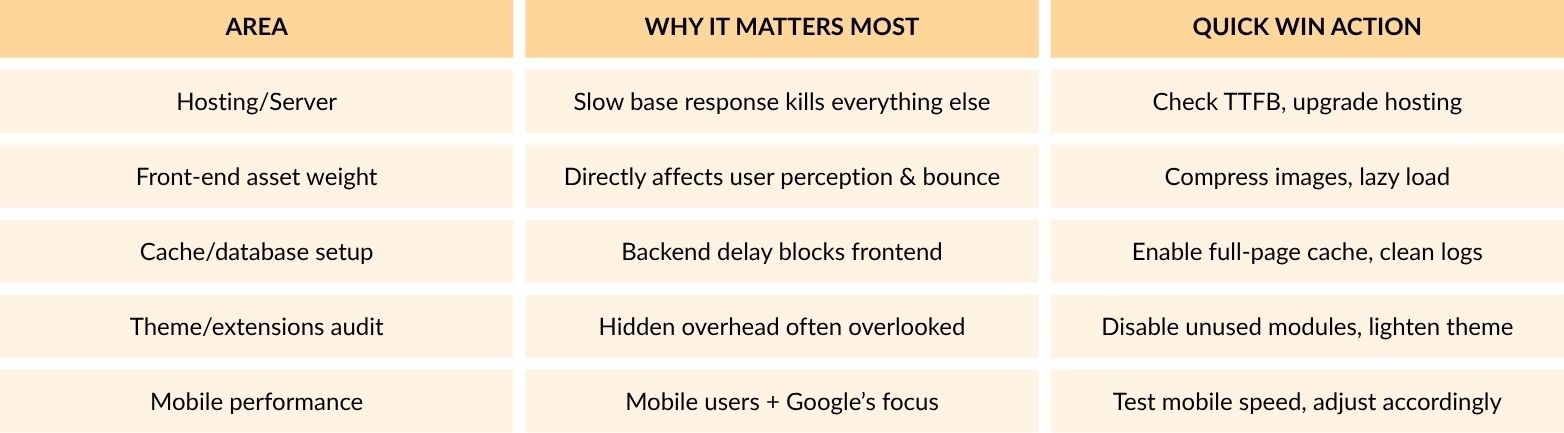
Start with the biggest impact items (hosting and asset weight), then progress through the list systematically.
Why working with an expert partner like 5MS helps
As a certified Magento agency with over ten years of experience, 5MS specialise in development, support and optimisation of Magento stores. If you prefer to focus on marketing, product and growth rather than technical tuning, partnering with experts ensures that performance issues get resolved correctly and sustainably. They can audit your store, implement fixes without disrupting your business, and provide ongoing support.
Conclusion
This Magento guide gives you a simple plan to find and fix the issues that slow down your store. Improving your server setup, front-end design, caching, and mobile performance will make your site load faster and create a better experience for shoppers. Start by focusing on one or two key problems, apply the fixes, and track the results. A faster Magento store builds trust with shoppers, keeps them browsing for longer, and encourages more sales. Take some time to review your site, make the changes that matter most, and give your customers an easy, enjoyable shopping experience every time they visit.