
A Magento redesign can help your online store look better and work faster. If your website looks old or customers leave without buying, it may be time for a change. Redesigning your Magento store makes it easier to use and helps you get more sales. This guide will show you what a Magento 2 redesign is, when you should do it, and how to plan it the right way.
What is a Magento Redesign?
A Magento redesign is a complete revamp of your store’s design, structure, and functionality to enhance user experience and boost performance. Refresh your site in a way that boosts performance, sharpens the user experience, and strengthens your bottom line.
A Magento 2 redesign may include:
- Updating the store’s visual design and layout
- Improving site navigation and product discovery
- Enhancing checkout speed and experience
- Upgrading extensions, security, and backend performance
- Migrating data if moving from Magento 1
When Should You Redesign Your Magento Store?
If your store is slow, looks outdated, or doesn’t work well for customers, a Magento redesign can improve it. Below are the signs your store is ready for an upgrade.
Sign #1: Slow Load Times Causing Cart Abandonment
Slow loading times frustrate shoppers and push them away before they reach the checkout. A redesign helps improve speed through cleaner code, better image optimisation, and updated technology.
Sign #2: Falling Conversion Rates Even With Steady Traffic
If people keep visiting your site but fewer are buying, something in the user journey needs attention. A redesign helps refine your layout, product pages, and checkout process so more visitors complete their purchase.
Sign #3: Outdated Visuals That No Longer Match Your Brand
Design trends change quickly. If your store looks old or no longer represents your brand style, a redesign updates your visuals and creates a stronger first impression.
Sign #4: Confusing Navigation That Slows Customers Down
When people struggle to find what they need, they leave. A redesign gives you the chance to rebuild menus, categories, and search features so browsing feels simple and smooth.
Sign #5: Technical Issues That Keep Building Up
Constant bugs or outdated extensions are clear signs your store needs structural improvements. A redesign helps remove problem areas and gives your site a cleaner, more reliable foundation.
Sign #6: Your Store No Longer Matches Your Business Growth
As your business expands with new products or new goals, your store should grow with it. A redesign helps your site reflect where your business is today and where you want it to go next.
Planning Your Magento 2 Redesign Project
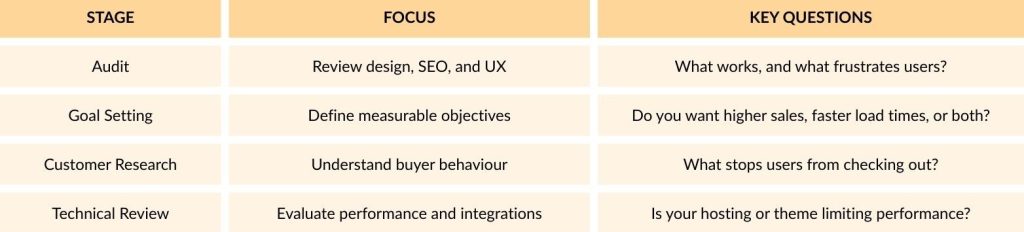
A redesign guided by real data will always outperform one based on assumptions.
Key Steps in a Magento Redesign Process
Let’s go step-by-step through what a full Magento 2 redesign usually involves:
1. Discovery and Strategy
Start by defining your audience, mapping user journeys, and setting design goals. Review competitors and identify UX opportunities that set your store apart.
2. Design and Wireframing
Collaborate with designers to create modern, user-friendly layouts. Test prototypes before full development to ensure your ideas match user expectations.
3. Development and Integration
Once the design is approved, developers build the new store in Magento 2. This stage includes coding, installing modules, and connecting CRMs or payment gateways.
4. Migration and Data Handling
If upgrading from Magento 1 or another platform, safely migrate your products, customers, and orders. Always back up your data before moving.
5. Testing and Quality Assurance
Run tests across devices, browsers, and checkout flows. Make sure load speed, responsiveness, and SEO performance meet expectations.
6. Launch and Post-Launch Optimisation
Once live, track metrics like conversions and page speed. Continue refining your site through A/B testing and performance monitoring.
Magento Redesign Best Practices
Here are the best practices to follow this year:
1. Design for Mobile First
More than 70% of shoppers now browse and buy using mobile devices, according to Statista. Your Magento redesign should therefore be built with a mobile-first approach.
Start by ensuring your pages load quickly and display correctly on smaller screens. Buttons should be easy to tap, text must be clear to read, and checkout forms should be simple to complete. A clean mobile layout encourages users to stay longer and finish their purchases.
2. Simplify Navigation
Good navigation can make or break a shopping experience. When planning your Magento redesign, focus on making it easy for visitors to find what they are looking for in just a few clicks.
Organise your categories clearly, use dropdown or mega menus for large inventories, and add visible filters to narrow search results. Simple, intuitive navigation helps shoppers browse with confidence and improves conversion rates.
3. Improve Site Speed and Performance
Slow websites drive customers away. Research shows that even a 1 second delay in page load time can reduce conversions significantly. During your Magento redesign, make site speed a top priority.
Compress large images, remove unused scripts, and enable caching. Hosting also plays an important role, so consider upgrading to high-performance Magento hosting for a faster and more reliable store. A loading time under 2 seconds creates a better experience and supports higher rankings on Google.
4. Optimise the Checkout Flow
Complicated checkouts are one of the main reasons for abandoned baskets. Streamline your process during the Magento redesign so customers can complete their purchase with minimal effort.
Offer guest checkout, remove unnecessary steps, and clearly display delivery costs before the final payment page. Providing secure payment methods such as Apple Pay, Google Pay, or PayPal also builds trust and reduces hesitation. A faster checkout means more completed sales.
5. Personalise the Shopping Experience
Customers respond positively to a tailored experience. Use the flexibility of Magento to show personalised recommendations, highlight popular items, or display recently viewed products.
Simple touches such as personalised discounts or reminders about items left in the cart make shoppers feel valued and encourage repeat purchases. A Magento redesign is the perfect time to introduce features that make your store feel more personal and engaging.
6. Ensure Accessibility for All Users
Accessibility should always be part of your Magento redesign. Follow WCAG 2.1 standards so everyone, including visitors with disabilities, can browse and buy with ease.
Choose readable font sizes, use strong colour contrasts, and add descriptive alt text for images. Make sure your website can be navigated using a keyboard as well as a mouse. Accessibility not only supports inclusivity but also improves your site’s overall usability.
7. Protect and Strengthen SEO During the Redesign
A redesign is an ideal time to review your SEO, but it can also harm rankings if handled incorrectly. Keep your existing URLs where possible and set up 301 redirects for any that change.
Review meta titles, descriptions, and internal links before going live to avoid losing visibility. You can also work with professional Magento SEO services to help maintain your rankings and attract more traffic once your new design launches.
Conclusion: Is It Time for Your Magento Redesign?
A Magento redesign gives your online store a fresh start with improved speed, design, and user experience that can lift sales and customer satisfaction. When your website looks dated or struggles to convert, a full redesign helps align your brand with how customers actually shop today. Done well, it enhances performance, protects SEO, and strengthens your store’s overall presence.
To make the most of your next project, contact 5MS and work with Magento experts who know how to build a store that looks better, runs faster, and converts more effectively.