
Optimisation tools give ecommerce teams a faster way to fix checkout friction, recover lost revenue, and turn more buying intent into completed orders. Cart abandonment still sits at roughly 70%, so even a small lift in checkout completion can move revenue far more quickly than another traffic campaign. Strong teams usually win here by combining analytics, behaviour tracking, payment speed, recovery flows, and testing instead of relying on a single app.
A lot of stores keep looking at checkout as one page. In practice, it is a chain of micro-decisions. A shopper checks delivery cost, looks for Apple Pay or card autofill, gets stuck in a field, wonders if a guest checkout exists, then leaves. The right optimisation tools help you catch each of those moments and act on them with clear evidence.
Table of Contents
What Are Checkout Optimisation Tools?
Checkout optimisation tools are platforms, apps, and features that help you spot friction, test improvements, speed up payment, and recover baskets that would otherwise go cold.
That matters because cart abandonment rarely comes down to one dramatic issue. It is usually a mix of hidden charges, weak payment choice, poor mobile form design, rigid account rules, slow pages, and a follow-up journey that never arrives.

How Should You Choose Optimisation Tools?
Choose optimisation tools based on the exact leak in your funnel, then stack them in the right order: measure, watch behaviour, remove friction, recover demand, and test again.
Start With the Drop-Off Point
That sequence matters. Many stores buy a recovery app first, then realise the real issue sits in payment choice or a broken mobile field.
Use Data Before You Add More Tools
The better route is to use funnel data and session evidence first, then add the tool that solves the drop-off you can actually see.
Let GA4 Guide the Decision
GA4 funnel exploration exists for this exact reason.
The 7 Best Checkout Optimisation Tools

1. Google Analytics 4
Best for:
Finding the exact step where checkout performance drops
GA4 is still the starting point for serious checkout work because it shows where users leave the journey. Funnel exploration lets you visualise each step and see where the leak sits, which makes it easier to separate a basket issue, a checkout issue, or a payment issue.
Why it earns a place in this list:
- Shows cart to checkout to purchase drop-off
- Helps segment mobile vs desktop behaviour
- Lets you compare paid traffic, email traffic, and direct traffic
- Gives you evidence before you change templates or apps
Pricing:
Free for the standard version. Google Analytics 360 is the paid enterprise tier with custom pricing.
Real-world example:
A retailer sees strong add-to-cart numbers yet weak sales. GA4 shows a heavy drop between shipping and payment on mobile. That points the team toward delivery messaging or payment friction, not product page changes.
Angle many teams miss:
GA4 becomes far more useful when you build a checkout-specific funnel instead of relying on standard ecommerce reports. For Magento, Shopify, and WooCommerce, clean event tracking matters here. If begin_checkout, shipping step events, payment step events, and purchase are messy, your reporting will push you toward the wrong fix.
2. Microsoft Clarity
Best for:
Seeing real frustration in checkout sessions
Microsoft Clarity adds the behaviour layer that numbers alone cannot show. Session recordings, heatmaps, and watchlists help you spot rage clicks, back-and-forth movement, field confusion, and checkout errors that never appear clearly in a chart. Microsoft also highlights checkout-error tracking in Clarity watchlists, which is useful for finding repeated friction fast.
Why it works well:
- Free entry point for behaviour analysis
- Quick way to watch sessions with friction
- Useful for mobile checkout review
- Strong partner tool alongside GA4
Pricing:
Free. Microsoft states there are no traffic limits and no paid upgrade requirement.
Real-world example:
A merchant sees decent traffic and decent intent but weak conversion on one shipping step. Clarity recordings show users tapping the delivery estimator repeatedly because the button sits too low on smaller screens. That fix can be simple and high impact.
Angle many teams miss:
Use Clarity to review only high-intent sessions. Watch users who reached checkout and left, users on mobile Safari, or users landing via Shopping ads. That gives you cleaner insight than watching random sessions.
3. Hotjar
Best for:
Combining user feedback with checkout behaviour
Hotjar is especially useful when you want direct voice-of-customer input beside recordings. Its survey and recording connection makes it easier to pair what users said with what they experienced. That is valuable during checkout work because people often leave for reasons analytics cannot label clearly.
Why teams rate it:
- On-page surveys capture objections in real time
- Recordings add context to survey responses
- Strong for identifying trust and clarity issues
- Helpful during redesigns or template rollouts
Pricing:
Free plan available. Paid pricing varies by product and usage, with Hotjar directing users to its pricing page for the latest plan costs.
Real-world example:
A beauty brand asks one simple question on basket and checkout pages: “What stopped you today?” Responses mention delivery cost arriving too late and a missing Klarna option. That insight shapes roadmap decisions far better than guesswork.
Angle many teams miss:
Use Hotjar on high-exit checkout pages only. Surveying the whole site gives you noise. Surveying the basket, shipping, and payment pages gives you action points.
4. VWO
Best for:
Testing checkout changes before rolling them out fully
VWO helps teams turn a theory into a measured test. Its ecommerce testing setup is built for validating ideas across product pages, cart flows, and checkout journeys. VWO also advises careful setup on shopping cart tests because small mistakes in implementation can skew results.
Why it belongs here:
- Lets you test specific checkout changes
- Useful for copy, layout, trust cues, and incentives
- Reduces risk when changing revenue-critical pages
- Supports structured CRO work instead of opinion-led changes
Pricing:
Custom pricing. VWO says its plans are flexible and pay-per-need, and it also offers an “Explore for Free” route rather than a simple flat public monthly price.
Test ideas worth running:
- Guest checkout message higher up the page
- Delivery estimate shown before address completion
- Card and wallet options reordered by usage
- Basket reminder beside payment step
- Trust badges moved near action buttons
Angle many teams miss:
Do not test five things at once in a low-traffic store. Test one tight change with a clear hypothesis. Checkout pages are sensitive. Clean tests beat flashy experiments.
5. Shop Pay
Best for:
Shopify stores that want faster repeat checkout
Shop Pay stores customer details for quicker checkout and is designed as an accelerated payment option for Shopify merchants. Shopify positions it as a fast one-tap experience and says it can recognise a huge base of Shop Pay users, while the help docs explain how it stores payment and shipping details for a smoother purchase path.
Why it performs well:
- Faster repeat checkout journey
- Strong mobile fit
- Reduces form effort
- Easy win for Shopify brands with returning users
Pricing:
Included within Shopify, so the practical cost sits inside your Shopify plan and payment fees. Shopify’s UK plans currently start at £19/month for Basic, £49/month for Grow, and £259/month for Advanced when billed yearly.
Real-world example:
A fashion store running paid social gets plenty of mobile traffic. Adding Shop Pay gives returning users a much shorter route at the moment they are ready to buy. That matters when ad traffic has low patience and high intent.
Angle many teams miss:
Accelerated payments tend to work best when the store already has strong trust signals and clear delivery messaging. Speed helps, though it cannot rescue a confusing offer.
6. Stripe Checkout and Link
Best for:
Stores that want a fast prebuilt payment experience across platforms
Stripe Checkout is a prebuilt payment form optimised for conversion, and Link lets customers save and reuse payment details across Link-enabled businesses. Stripe states that Link can make checkout 3x faster than non-Link customers and cites an average 14% lift in returning user conversion for businesses with a large repeat customer base.
Why this is strong:
- Fast route to a polished checkout experience
- Great for custom builds and lean dev teams
- Saved details reduce friction for repeat buyers
- Good fit when teams want fewer checkout maintenance headaches
Pricing:
No monthly fee for standard use, but transaction fees apply. Stripe lists standard EEA card pricing at 1.5% + 1.00 zł and premium EEA cards at 1.9% + 1.00 zł on the pricing page I could access; Link sits within Stripe’s payments pricing rather than as a separate monthly subscription. Pricing varies by market.
Real-world example:
A subscription brand uses Stripe Checkout to simplify billing and launch quicker. Link then helps repeat customers pay in seconds, which matters when purchase intent is already high and every extra field adds risk.
Angle many teams miss:
This kind of tool is as much a delivery decision as a payment decision. A prebuilt checkout can shorten dev time, reduce QA pressure, and free your team to test messaging and offer structure instead of rebuilding payment UX.
7. Klaviyo Abandoned Cart Flow
Best for:
Recovering high-intent users after they leave
Klaviyo includes prebuilt abandoned cart flows once the ecommerce integration is in place, and its guidance encourages teams to tailor flow logic, splits, and content around buyer behaviour. Shopify also supports abandoned checkout recovery and discount-enabled recovery links, which can work well alongside a more tailored CRM setup.
Why it matters:
- Catches revenue after the session ends
- Supports dynamic product content
- Can split by value, category, or buyer status
- Works well with email and SMS journeys
Pricing:
Free plan available. Klaviyo’s free tier includes up to 250 active profiles, 500 email sends per month, and 150 mobile message credits; paid pricing then scales based on list size and usage.
Real-world example:
A supplement brand sends a first reminder without discount, then a later email with social proof and urgency. High-value baskets get a different sequence than low-value baskets. That protects margin while still chasing recovery.
Angle many teams miss:
Recovery flows work best when they mirror the reason for abandonment. If the shopper left due to delivery cost, a generic “you forgot something” email feels weak. A stronger message might highlight shipping threshold, dispatch speed, or a payment option they can use next time.
Which Optimisation Tools Suit Each Platform Best?
The best optimisation tools depend on your platform, your dev resource, and how much control you have over checkout.
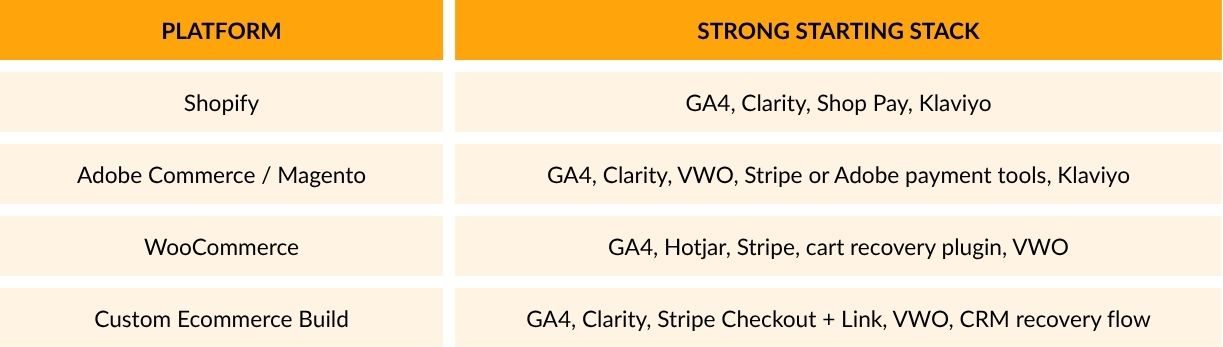
Adobe Commerce adds another useful layer here. Adobe’s Payment Services guide highlights checkout configuration options such as credit card vaulting, while Adobe developer guidance supports checkout payment customisation via separate modules rather than editing core code. That gives merchants more flexibility, though it also raises the need for careful QA.
What Usually Delivers the Fastest Win?
The fastest win usually comes through fixing one obvious point of friction backed by evidence, then pairing that change with a recovery flow. For one store, that may be a guest checkout. For another, it may be faster payment options, clearer shipping cost, or a broken mobile field. The best optimisation tools help you find the easiest revenue lift first instead of sending your team into a long redesign cycle.
A simple order of priority looks like this:
- Build a clean GA4 checkout funnel
- Review Clarity or Hotjar behaviour on key drop-off
- Add or improve fast payment options
- Launch abandoned cart recovery
- Test one checkout change at a time

Conclusion
Optimisation tools reduce cart abandonment when each tool solves a clear problem in the checkout journey. Start with GA4 to measure checkout performance; use Clarity or Hotjar to spot user behaviour, VWO to test changes, Shop Pay or Stripe Checkout with Link to speed up payment, and Klaviyo to win back lost sales. Put together, these seven tools give you a practical stack that helps shoppers finish what they started and helps your team grow revenue with clearer decision-making.