

Magento support value is the real impact support has on your store’s performance. It shows up in fewer checkout errors, higher payment success, faster pages, cleaner data, and fewer last minute issues when you are running campaigns. It also helps you spot problems early so sales do not dip without warning.
This article explains how to measure that impact in a simple, repeatable way. It covers the KPIs that matter most for Magento stores and a clear method to tie support work back to trading results.
What Is Magento Support Value?
Magento support value means support work that changes a business outcome you can track. Think fewer checkout errors, higher payment success, faster product listing pages, cleaner tracking, and fewer urgent incidents. It becomes measurable once each ticket links to one KPI and one proof source like GA4, logs, Search Console, or a payment dashboard.
What “Value” Looks Like In Day To Day Operations
Support value often looks like this:
- Fix a checkout error spike and recover conversion on mobile
- Stop payment failures after a gateway update
- Improve category page speed and reduce paid traffic bounce
- Unblock a promo launch with a safe rule setup
- Keep security patches on schedule so the store stays stable

Why Do Most Stores Struggle To Prove Magento Support Value?
Most stores struggle because support gets reported as tasks and hours rather than outcomes. Hours used can look busy even when trading impact stays flat. A support team can prove value fast once everyone agrees on a small KPI set and a simple way to tag tickets with a business outcome.
The Real Reasons Reporting Falls Apart
Common issues:
- Tickets sit in a long backlog with no clear business priority
- Fixes ship with no “before and after” reference
- Trading teams see support as reactive work only
- Marketing blames platform issues while dev teams blame tracking
- Security work feels invisible so it gets delayed
The Key Shift That Changes Everything
Move away from thinking in support tasks and start managing a value backlog instead.
A value backlog means each item has:
- One outcome tag
- One KPI link
- One proof source
That is enough to make support measurable without turning it into paperwork.
How Do You Measure Magento Support Value Without Heavy Admin?
Measure magento support value using a one tag rule on every ticket plus a weekly outcome review. Each ticket gets one value tag, one KPI link, and one proof source. A short weekly review pulls the KPI trend and records a one sentence impact note. Over time you build a clean record that holds up in finance reviews.
Step 1: Add One Value Tag To Every Ticket
Use one tag only. Keep it simple:
- Revenue Protection: Stops lost orders
- Conversion Lift: Improves a funnel step
- Cost Reduction: Removes manual work and waste
- Risk Reduction: Security and stability work
- Enablement: Helps teams ship campaigns faster
Step 2: Link Each Ticket To One KPI
One KPI only. Examples:
- Checkout error rate
- Payment success rate
- Core Web Vitals trend
- Uptime and incident count
- Feed disapprovals
- Add to cart event health
Step 3: Add One Proof Source
Pick one place that shows the change:
- GA4 event reports
- Server logs
- Search Console
- Payment service dashboard
- Merchant Center diagnostics
- Monitoring alerts
A Simple Scoreboard That Helps Prioritisation
Create a tiny table in your support report:
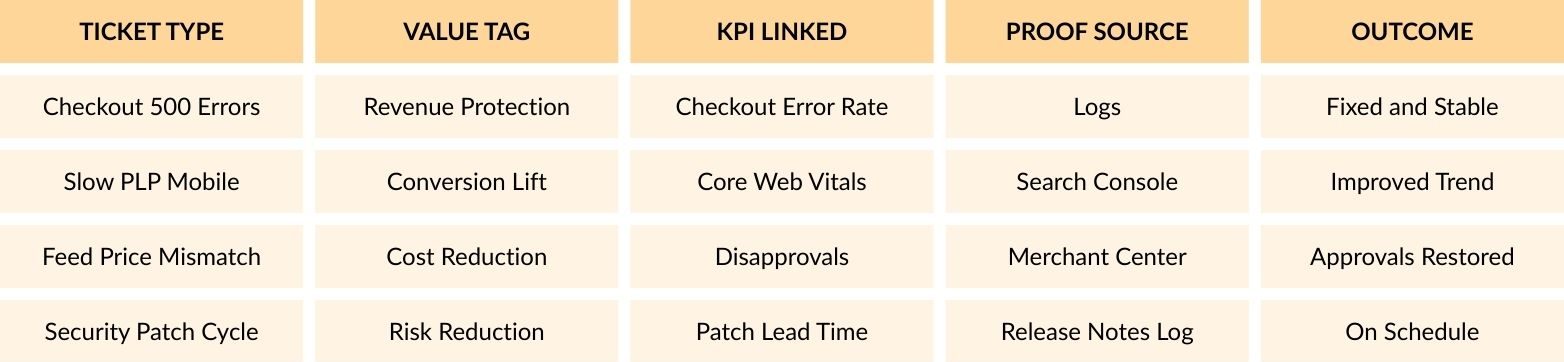
This is the core engine behind a magento support value reporting.
Which KPIs Prove Magento Support Value Week To Week?
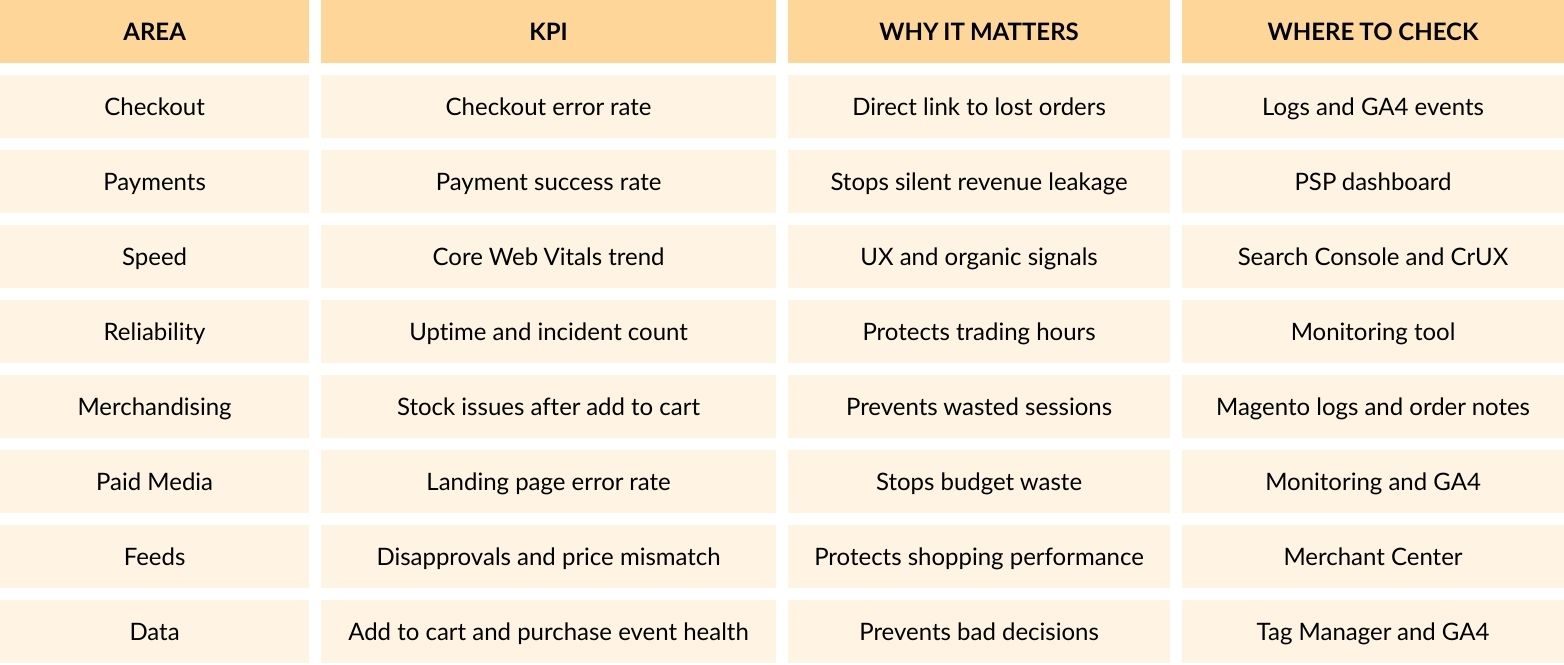
Use KPIs that match how Magento stores lose money in real life. Focus on checkout stability, payments, speed, uptime, feed health, and tracking accuracy. Keep the list short so it stays usable in a weekly rhythm.
Recommended KPI Set For Magento Stores
What Support Work Creates The Biggest Commercial Gains?
The biggest gains usually sit in checkout stability, payment success, page speed on key templates, feed health, and tracking reliability. Security work also ranks high because the downside risk is massive. Prioritise work that protects buying journeys and paid traffic first.
Insight 1: Treat Tracking Breakage As Trading Risk
Tracking issues feel like a marketing problem until budget decisions go wrong.
Examples that damage revenue:
- Add to cart event stops firing after a theme change
- Purchase event duplicates and inflates performance
- Consent setup blocks tags on key pages
Support that keeps measurement stable adds magento support value because it protects decision quality.
Insight 2: Feed Health Often Outperforms Small UX Tweaks
A broken feed can tank Shopping and Performance Max performance fast.
Real issues seen in Magento stores:
- Parent child structure hides variants in ads
- Price mismatch triggers disapprovals
- Shipping attributes missing or incorrect
Support that keeps feeds clean often shows quick wins in paid performance and operational time saved.
Insight 3: Patch Work Needs A Calendar And A Test Routine
Patching becomes painful when it turns into panic work.
A better pattern:
- Track Adobe release schedule
- Maintain a short test checklist
- Deploy on a predictable cycle
That reduces incidents and keeps the store stable during peak weeks.
Insight 4: Security Value Can Be Measured Even When Nothing Breaks
Security work still has measurable signals:
- Patch lead time
- Number of high risk extensions reviewed
- Admin account audit frequency
- WAF rule changes recorded
- Incident count trend over time
This supports the risk reduction side of magento support value.
Insight 5: Price Downtime In A Simple Way
You do not need a complex model.
Use:
- Average revenue per hour during trading
- Multiply using outage hours
- Add paid spend waste if ads kept running
- Add time spent fixing and customer care impact
This makes incident response value clearer in budget talks.
How Do You Link Tickets To Revenue In A Clean Way?
Link tickets to revenue using three fields and one weekly habit. Each ticket needs a value tag, a KPI link, and a proof source. Each week you capture the KPI change and write one short outcome note. This keeps reporting clean and avoids long slide decks.
The Three Ticket Fields That Matter
Add these to your support template:
- Value Tag
- KPI Linked
- Proof Source
Nothing else is required.
A Weekly Reporting Format That Stays Readable
Use four blocks:
Outcomes
Three bullets on what changed.
Revenue Risk Removed
One bullet with the best example.
Open Risks
Short list of items that can hurt trading.
Next Focus
Three items that fit business priorities.
Real Example: Mobile PLP Speed Fix
- Problem: Mobile PLP loads slowly and paid traffic bounces
- Support Work: Image and cache adjustments plus template tidy up
- KPI: Core Web Vitals trend and PLP bounce rate
- Proof Source: Search Console and GA4
- Value Tag: Conversion Lift
How Do You Choose A Retainer That Protects Magento Support Value?
Choose a retainer that matches trading risk and change pace. You need enough cover to keep patching on schedule, fix incidents fast, and still deliver improvements that lift KPIs. The best retainer also produces reporting that ties work to outcomes.
A Practical Fit Check
A retainer usually makes sense when:
- Paid traffic is a big driver
- The store runs frequent promos
- Third party integrations matter
- Checkout downtime is expensive
- Internal teams need fast changes
Questions That Reveal Support Quality Fast
Ask these:
- How do tickets link to KPIs in reporting
- What is the patch and test cadence
- How do you spot tracking issues early
- How do you handle payment incidents
- How do you manage extension updates and risk review
Conclusion
Magento support value becomes measurable when every ticket links to one business outcome and one KPI. Use a one tag model, keep a short KPI set, and run a weekly outcome review. Prioritise checkout, payments, speed on key templates, feed health, tracking reliability, and a steady patch routine. That turns support into a clear trading asset with proof you can show any week.