
Launch new markets faster when you treat expansion like a repeatable release and not a one off project that gets rebuilt every time. The quickest teams choose markets with clear demand signals, launch a tight first version that covers checkout and delivery properly, then reuse the same process so each rollout is easier than the last.
In this article you will get 10 practical tips that speed up decision making, reduce rework, and help you launch with confidence.
Table of Contents
What Does Launch New Markets Mean In Ecommerce?
Launching a market means selling into a new country or region with an experience that feels local and works end to end. That covers pricing in local currency, delivery promise, returns, support, tax and duties approach, plus a checkout that includes payment methods shoppers trust.
Speed comes when you ship a tight first version then improve using real behaviour and real orders. Treat each market like a product release.

How Do You Pick A Market You Can Launch Fast?
Pick a market with proven demand signals and low operational friction. The fastest launches usually come from markets already sending you traffic, sharing language overlap, or sitting within simple delivery lanes.
A quick scoring pass saves weeks.
Fast Market Fit Scorecard
Rate each market 1 to 5 and total it.
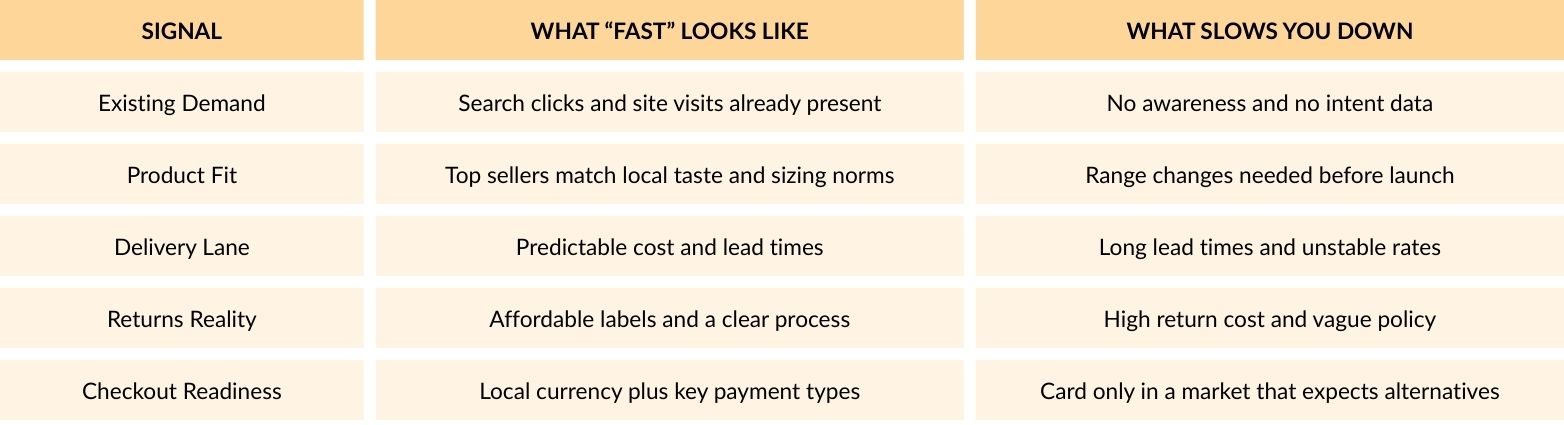
If returns cost is high you either limit the range or you accept slower growth while you solve logistics.
How Do You Validate Demand Before Building Work?
Validate demand using signals you already own, then run small tests that mimic a real launch. The aim is proof of intent and early conversion signals, not a perfect site.
Start With Your Own Data
Search Console and GA4 can show country level interest and landing pages that already work. That shortlist often beats any brainstorm.
Add A Lean Paid Test
Run a small Shopping or Meta test to a market specific landing page that shows local currency, delivery window, and returns summary. If clicks look good but checkout starts to stay low, you likely have a localisation gap.
Check Payment Expectations Early
Local payment gateways can materially affect conversion in cross border trade, so it is smart to test payment fit before heavy translation work.
What Must Be Ready Before You Launch New Markets?
Before you launch new markets, lock the foundations that stop rework. That means a clear delivery and returns promise, payment and currency setup, channel readiness, and tracking that captures the full journey.
Customer Experience
- Local currency across product, cart, and checkout
- Local language on key pages such as shipping, returns, and top categories
- Delivery promise that matches carrier reality
- Returns policy that is easy to understand
Checkout and Payments
- Payment methods that match local habits
- Fraud checks tuned for cross border orders
Operations
- Duties approach agreed such as DDP versus customer paid duties
- Carrier services chosen with tracking and predictable lead times
- Support plan agreed so customers get answers quickly
Channels
- Product feed rules ready for the market
- Shipping settings aligned in Merchant Center for the target country setup
Measurement
- GA4 tracking validated across the journey, especially if checkout sits on a separate domain
Top 10 Tips To Launch New Markets Faster
Below are 10 practical tips that speed up delivery while keeping quality high. Each one supports the goal to launch new markets quickly without leaving a mess behind.
1) Write A One Line Market Promise
Your promise is the anchor for every decision. Keep it simple and measurable.
Example: Prices in EUR, delivery in 3 to 5 working days, 30 day returns.
If your operations cannot meet the promise, adjust scope before you build.
2) Start With A Tight Page Set
Do not translate the whole site on day one. Launch with pages that remove buying fear and drive conversion.
Prioritise:
- Shipping and returns pages
- Top categories
- Top 20 product pages
- Checkout microcopy and error messages
Then expand content based on search demand and support tickets.
3) Localise Checkout First, Not Last
Checkout friction is the fastest way to waste paid spend. Sort currency and payment methods early so testing is meaningful.
Shopify’s market tooling is built around market level settings and storefront experience control. That model is useful even if you are not on Shopify.
4) Decide Duties And Tax Approach Upfront
Surprise fees at delivery drive refunds and support load. Agree the approach early.
Quick decision guide:
- If your price point is premium, DDP often reduces friction
- If margins are tight, start with clear customer paid duties and very direct messaging
5) Build A Repeatable Pricing Framework
Avoid manual pricing per SKU per market.
Set rules for:
- FX handling and update frequency
- Rounding per currency
- Promo exclusions
- Margin guardrails for heavy items
A framework turns pricing into a system, not a weekly job.
6) Use Local Search Intent, Not Direct Translation
Translation rarely matches shopping language. Start with local category phrases and product naming patterns.
Practical approach:
- Pull top queries per market
- Map them to your taxonomy
- Adjust category labels and on page copy for intent
This gives faster organic traction and reduces the urge to rebuild navigation later.
7) Treat Feeds As A Launch Workstream
Many teams build the site then scramble in feeds. That slows channel testing.
Market feed checklist:
- Product identifiers such as GTIN where available
- Shipping attributes and delivery times aligned with your promise
- Targeting setup and country level configuration in Merchant Center
A clean feed makes it easier to launch new markets with Shopping campaigns that actually scale.
8) Pre Build A 30 Minute Launch QA Script
Speed improves when quality checks are routine and fast.
Your QA script should cover:
- Currency consistency across PDP, cart, checkout
- Delivery cost and ETA accuracy
- Payment method display and success flow
- Confirmation emails and order status pages
- Tracking event firing in GA4 across the journey
Keep it short. Run it every time.
9) Limit Channels In Week One
Start with two channels max so you can see signals clearly.
Common pairing:
- Google Shopping for high intent
- Branded search to protect demand capture
Once tracking and ops settle, add prospecting and affiliates.
10) Run A Two Week Fix Sprint After Go Live
Book this sprint before launch day. It is not optional.
Focus on:
- Drop off points in checkout
- Delivery messaging clarity
- Returns questions and objections
- Feed disapprovals and missing attributes
- Product page gaps based on search queries
This sprint is where you lock momentum and make the next market easier.
Which Platform Setup Helps You Move Faster?
A quicker setup lets you control currency, language, taxes, shipping rules, and content by market, without rebuilding pages each time.
Shopify Market Controls
Shopify Markets lets you group countries and set rules per market, so you can handle currency display, domains, and local checkout details in one place.
Magento And Adobe Commerce Multi Store Structure
Magento and Adobe Commerce support multi store setups under one admin. This works well when you need separate storefronts per country, shared catalogue control, and clear separation of pricing, content, and tax settings.
What Decides Speed In Real Projects
The platform helps, but launch speed usually comes down to clean data, simple rules, and a consistent release process. That is what keeps you launching new markets without rolling back changes or patching issues later.
When Specialist Help Makes Sense
If your setup includes custom checkout work, complex shipping logic, or messy product feeds, progress can stall fast. 5MS is a full service ecommerce agency that helps brands move quicker with Magento and Adobe Commerce development, technical support, performance fixes, integrations, and ongoing optimisation, so international rollouts stay stable and scalable.
How Do You Measure Success After Launch?
Week One Signals To Track
- Conversion rate and checkout completion
- Payment failure rate
- Refund and return rate on top SKUs
- Delivery time variance versus the promise
- Support ticket themes and repeat questions
Make Sure Tracking Covers The Full Journey
Tracking needs to capture the whole path, especially when checkout runs on a separate domain. Validate GA4 events across product view, add to cart, begin checkout, and purchase so your reporting stays trustworthy.
Watch Payment Method Mix
Payment method mix can flag hidden friction fast. If a market is not using the options you expect, or failures cluster around one method, it usually points to a localisation issue or a trust gap.
Common Traps That Slow Market Launches
These patterns slow teams down and create rework.
Trap #1: Translating Everything Upfront
Full site translation often delays launch, and it can miss local search intent. Start with key pages and expand based on real queries and customer questions.
Trap #2: Leaving Duties And Returns Unclear
Vague duties and returns messaging leads to refunds and support load. Make the policy simple and visible before you scale traffic.
Trap #3: Treating Feeds As An Afterthought
Feed issues stall Shopping tests and waste budget. Clean identifiers, shipping settings, and country targeting early so you can test properly.Feed issues stall Shopping tests and waste budget. Clean identifiers, shipping settings, and country targeting early so you can test properly.
Trap #4: Launching Without A QA Routine
Without a short QA routine, small issues become big problems. Check currency, delivery messaging, payment flow, emails, and tracking before you send traffic.
Trap #5: Adding Too Many Channels Too Soon
Too many channels early makes performance hard to read and hard to fix. Start with one or two sources, stabilise, then expand.
Conclusion
To launch new markets faster, pick a low friction market, validate demand with real signals, and ship a minimum lovable launch that includes local currency, local payments, clear delivery, and a workable returns plan. Use a repeatable QA script and a two week fix sprint so each launch gets easier, cleaner, and quicker than the last.