
If you want to know how to set up ChatGPT ads, this is a first-hand account rather than a rewrite of OpenAI’s docs. At 5MS we are a UK eCommerce agency and Adobe Solution Partner, and we run paid media for our own store and for clients. When a new ad platform opens its beta, we want real data before we recommend it, so we put our own money and our own store into the OpenAI Ads Manager: we built a product feed from scratch, deployed the pixel, uploaded our contact list and watched what actually happened. This is that account, with the real numbers and the gotchas nobody warns you about.
Everything below is based on our own setup as of July 2026. ChatGPT ads are in beta, so specifics may change as the platform develops.
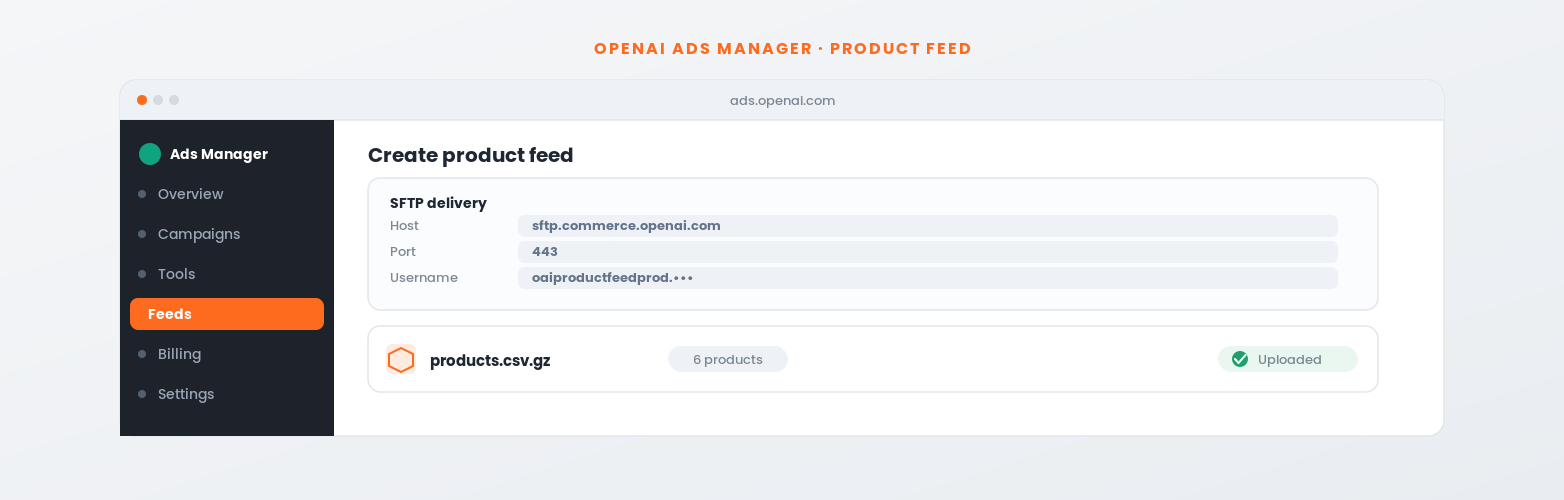
Products in our test feed
1,000 minimum is a myth
SFTP port for the feed
sftp:// prefix required
Reported default CPM
Early beta figure
Keyword targeting options
It is not Google Ads
To set up ChatGPT ads, install the OpenAI measurement pixel, create a product feed and upload it via SFTP, then build a product-feed campaign in the OpenAI Ads Manager at ads.openai.com. Setup is quick and a small catalogue works fine (we ran a six-product feed). The catch: targeting is blunt versus Google Ads, and email audience matching only reaches people who already have a ChatGPT account. Worth testing for the learning, not yet a replacement for intent-driven Google or Meta spend.
📄 In This Guide
02What you need before you start
03Set up measurement first
04How to set up a product feed
05The 1,000-product minimum myth
06What ChatGPT ads cost
07ChatGPT ads vs Google Ads
08How targeting and audiences work
09Building the campaign
10Clicks, reach or conversions?
11Are ChatGPT ads worth it?
12Frequently asked questions
Learning how to set up ChatGPT ads starts with knowing where you are working. The OpenAI Ads Manager lives at ads.openai.com and is organised around Overview, Campaigns, Tools (Change History, Conversions, Audiences and Feeds), Billing and Settings. It is a beta, so the interface is noticeably thinner than Google Ads or Meta: fewer options, some rough edges, and gaps where the documentation has not caught up with the UI.
To get started you need an eligible ad account with billing set up. There is no open self-sign-up at the time of writing; access is rolling out to selected accounts. It sits alongside the other emerging AI-driven channels we track in our guide to AI in eCommerce.
We set everything up on 5MS’s own store before taking it to clients. The products we advertised were our Magento support and development packages, so the test was commercially real: genuine products, landing pages, budget and conversion goal (enquiries).
This is the most important setup advice we can give. The ChatGPT measurement pixel (a JavaScript snippet with a global function called oaiq) needs to be installed sitewide in the head before you create any campaigns. Without it, OpenAI’s system has nothing to learn from and you are spending into a black box.
We installed it on WordPress via a Custom Code snippet set to load in the head across the whole site, then verified oaiq was firing on the front end before going further.
Next, set up at least one conversion event in Ads Manager (Tools > Conversions). We used a lead_created event because our goal is enquiries, not direct sales, and wired it to fire on four triggers: Contact Form 7 submissions, mailto clicks, file downloads, and booking links (Calendly, Cal.com, HubSpot meetings). OpenAI also offers a Conversions API for server-side tracking. The full setup is documented in the OpenAI measurement pixel docs.
Pixel install, conversion configuration and event firing all behave the way Google Ads or Meta advertisers expect. Get it live before you touch campaigns.
If you run Google Tag Manager (GTM), that is the cleanest place to deploy both the pixel and the conversion event, no theme edits required. The setup mirrors any other pixel:
If you do not use GTM, a header code-snippet plugin (or your theme’s head/footer injection) does the same job. The important thing is that the base pixel loads sitewide and the conversion fires on a real completed action.
This is where most guides fall short. The ChatGPT ads product feed uses SFTP delivery, not a URL crawl, and the file format has specific gotchas that cost us time first time round. Here is the exact process.
| Field | Notes |
|---|---|
| item_id | Unique per product or variant. Max 100 chars. |
| title | Max 150 chars. |
| description | Plain text. Max 5,000 chars. |
| url | The product landing page. This is where ad clicks go. |
| image_url | Publicly accessible image URL. |
| price | Currency in the same field: 399.00 GBP. No separate currency column. |
| availability | e.g. in_stock |
| brand | Your brand name. |
| seller_name, seller_url | Your store name and homepage URL. |
| return_policy | URL to your returns or T&C page. |
| is_ads_eligible | Set to true for any product you want to advertise. |
The full field specification is in the OpenAI product feed spec.
You do not need a developer. Build the feed in a spreadsheet, then export and compress it:
Do your edits in the spreadsheet, then re-export and re-upload under the same filename whenever prices or products change. The feed refreshes automatically each time you overwrite the file.
“Invalid protocol specified” means you left https:// in the Host, change it to sftp://. A blank Port also fails, it must be 443. If authentication fails, you have probably pasted only part of the username.
id instead of item_id. The field name has to be exact.399.00 GBP.feed_id, account_id and similar as columns. These belong to OpenAI’s separate Agentic Commerce API. The SFTP feed handles identity via the username. Remove them.https:// in the FileZilla host. It must be sftp://sftp.commerce.openai.com.Multiple third-party guides say you need at least 1,000 products to run product-feed campaigns. OpenAI’s own documentation does not state this, and our direct test disproved it.
We uploaded a six-product feed. It was accepted, processed and showed “6 products / Uploaded” with no rejection or warning, and we ran product-feed campaigns against it. The “1,000 minimum” looks like a carry-over assumption from other platforms. If you have a small catalogue, a niche range, or a handful of service packages formatted as products, do not let this claim stop you.
Our six products were Magento service packages reformatted as enquiry pages, not physical goods. The feed accepted them and the technical side worked, though the ad experience for service businesses is not fully productised yet.
OpenAI does not publish a self-serve minimum budget in its documentation at the time of writing. Based on early reporting from other advertisers and setup guides, the platform runs on both CPC and CPM bidding, with reported default CPMs around US$60 and suggested starting CPC bids in the region of US$3 to US$5. Some sources cite much higher minimum commitments for managed or large accounts, but that did not apply to our self-serve beta test.
Two honest points. First, these figures are early and will move, so treat them as ballpark, not gospel. Second, cost per thousand impressions matters far less than whether the targeting can put those impressions in front of the right people. Right now that is the real constraint, not the headline CPM. If you are weighing budget across channels, our guide to Meta ads for eCommerce is a useful comparison point.
| Factor | ChatGPT Ads (beta) | Google Ads |
|---|---|---|
| Intent targeting | No keyword buying; products chosen at serve time | Full keyword and intent targeting |
| Audience matching | Only ChatGPT account holders; minimal match for most B2B lists | Customer Match; higher match rates |
| Setup complexity | Simpler, fewer options, faster to launch | More complex, steeper learning curve |
| Measurement | Pixel and Conversions API; straightforward | Mature, extensive ecosystem |
| Minimum catalogue | None enforced; six products accepted | Shopping favours larger catalogues |
| Targeting precision | Blunt; limited control | High: keywords, audiences, placements, devices |
| Platform maturity | Beta; thin interface; docs catching up | Mature, deep documentation and tooling |
| First-mover value | High; early data before competitors | Low; saturated in most categories |
The core difference is the intent model. Google Ads places your ad against a specific search at a specific moment: high intent, high precision. ChatGPT ads serve into conversations, with OpenAI choosing which feed product to show based on signals you cannot fully inspect yet. You influence the output with product-set filters, not keyword bids. That is a fundamentally different model, and today it means much less control.
ChatGPT ads targeting is not like Google Ads targeting, and misunderstanding this causes most of the disappointment people report.
In a product-feed campaign you set up an ad group with a product set linked to your feed ID, optionally filtered by attributes like brand or product type. At serve time OpenAI selects an eligible product from that set. You do not bid on a keyword and you are not meeting a user at the moment of explicit intent. The reach is real; the precision is not there yet.
For custom audiences you can upload emails and phone numbers, similar to Google Customer Match or Meta Custom Audiences. The catch most guides skip: matching only works for contacts who have a ChatGPT account tied to that exact email or phone number.
We uploaded roughly 4,000 emails from our own database. The usable match was minimal, because most of our list simply does not have ChatGPT accounts under those addresses, especially in B2B where work emails differ from the personal emails people use for consumer tools. That is not a flaw in OpenAI’s matching; it is how identity matching works on a young consumer platform.
Do not build your ChatGPT ads plan around high email match rates. A 50,000-contact CRM might convert to a tiny reachable audience here. If you use a list, upload both email and phone, lean on consumer/personal contacts over locked-down work emails, and keep expectations realistic.
The question we get most is “where do I put my keywords?” On ChatGPT ads, you do not, at least not the way you would in Google. There is no keyword bidding and no search-term report. Instead you influence serving in two ways.
So the practical “keyword” strategy is really a content strategy: write feed titles and descriptions the way people describe the problem your product solves, and let the product-set filters keep irrelevant items out. It is blunter than Google, but well-written product text genuinely affects what serves.
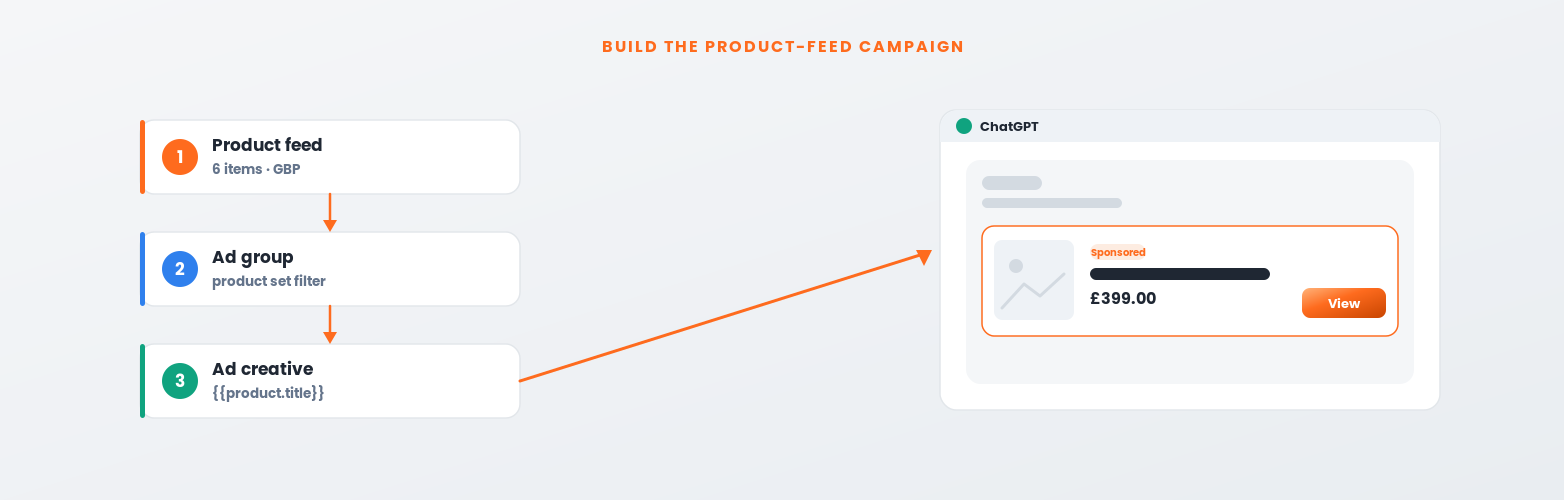
product_feed as the mode. This cannot be changed after creation.{{product.title}}, {{product.body}} and {{product.price}}. The image and destination URL come from whichever feed item is served.url in that feed row, so make it count. We turned our product pages into dedicated enquiry pages with a clear offer and a strong call to action.For non-feed campaigns (standard chat card creative) you supply your own image and target URL directly.
When you build the campaign you pick an objective, and it decides what the system optimises for and how you are billed. The three you will see map to the classic funnel.
| Objective | Optimises for | Billed | Best when |
|---|---|---|---|
| Reach | Showing your ad to as many relevant people as possible | CPM | You want visibility and to learn the platform. Weakest on accountability. |
| Clicks | Driving visits to your landing page | CPC | Your landing page does the converting. A sensible default for a first test. |
| Conversions | Actions your pixel tracks (sale, lead) | CPC/CPM | Your pixel and event are live and collecting data. Needs volume to learn. |
The honest sequence for a beta platform: do not jump straight to Conversions. A conversion-optimised campaign needs a steady flow of tracked conversions to learn from, and in a new channel with limited volume it can starve. We would start on Clicks to get traffic and prove the landing pages, keep the conversion pixel firing in the background so data builds, and only move to a Conversions objective once there is enough volume to optimise against. Use Reach only if pure awareness is the goal.
On bidding, ChatGPT ads support CPC and CPM. Start with modest caps, watch cost per click and cost per enquiry, and raise bids only where the numbers justify it. Because targeting is blunt, keep a close eye on where clicks actually come from before scaling spend.
It depends entirely on what you expect from the platform.
You want first-mover learning before competitors understand it, your success metric is awareness or cheap early-stage enquiries rather than tightly targeted conversions, and you have budget to treat this as an experiment. The time cost is low, the measurement works, and a small catalogue is fine.
You need Google-Ads-level intent targeting, your plan depends on matching an existing email list at high rates, or every pound has to deliver trackable ROI against a clear conversion target. The platform is not there yet for those.
Our summary: setup is more accessible than most people expect, the measurement foundation is solid, and the “1,000 product minimum” myth should not stop small businesses experimenting. But the targeting is weak versus Google or Meta today, and the email audience matching has a structural limit most guides skip. Test it as a funded learning exercise; do not move your Google or Meta budget onto it yet. If you want a second opinion on where your spend works hardest, that is exactly what our eCommerce services team does every day.
Victoria leads paid media and SEO at 5MS, a UK eCommerce agency and Adobe Solution Partner. This post is based on 5MS’s own direct testing of the OpenAI Ads Manager beta (pixel deployment, feed setup and audience matching), July 2026.
To set up ChatGPT ads, install the OpenAI measurement pixel sitewide, create a product feed in the OpenAI Ads Manager and upload it via SFTP as a gzipped CSV (host sftp.commerce.openai.com, port 443, sftp:// prefix), then build a product-feed campaign. Include required fields such as item_id, title, url, image_url, price with the currency in one field like 399.00 GBP, and is_ads_eligible set to true. No 1,000-product minimum applies (a six-product feed was accepted), free products are rejected, and audience matching only reaches contacts who already have a ChatGPT account. Setup and measurement are straightforward, but targeting is far blunter than Google Ads, so treat ChatGPT ads as a funded learning exercise rather than a like-for-like replacement for Google or Meta spend.
Common questions about how to set up ChatGPT ads. Get in touch if yours is not here.
Create a feed in OpenAI Ads Manager (Tools > Feeds), choose SFTP delivery, and note your credentials (host sftp.commerce.openai.com, port 443, username oaiproductfeedprod.<feed-id>). Build a gzipped CSV with required fields including item_id, title, url, image_url, price with the currency in one field such as 399.00 GBP, and is_ads_eligible set to true. Upload via an SFTP client like FileZilla to the root path with a stable filename.
No, at least not based on our direct test. We uploaded a six-product feed and it was accepted and processed without error or warning. The “1,000 product minimum” appears in third-party guides but is not stated in OpenAI’s official documentation, and it was not enforced when we tested. Small catalogues and service packages formatted as products both work.
Install the OpenAI measurement pixel (a JavaScript snippet exposing a global oaiq function) sitewide in the head, before creating campaigns. The cleanest route is Google Tag Manager: a Custom HTML tag with the base pixel firing on All Pages, plus a second tag with the oaiq event on the action that matters. On WordPress, a header code-snippet plugin does the same job. Verify oaiq fires before you spend.
You upload a list of emails and phone numbers as a custom audience, similar to Google Customer Match or Meta Custom Audiences. The catch: matching only works for contacts who have a ChatGPT account under that exact email or phone. For most B2B lists the overlap with ChatGPT’s user base is small, so expect much lower match rates than Google or Meta.
No. Google Ads is intent-driven: a user searches a keyword, you bid on it, your ad appears at the moment of demand. ChatGPT ads serve into conversations, with OpenAI selecting a product from your feed at serve time. There is no keyword-level targeting, so precision is significantly weaker than Google Ads today.
OpenAI does not publish a self-serve minimum budget at the time of writing. Early reports suggest CPM and CPC bidding with default CPMs around US$60 and starting CPCs of roughly US$3 to US$5. These are beta-stage figures and will change. For most advertisers the bigger question is whether targeting is precise enough to spend efficiently, which today it is not.
Yes, technically. Setup is accessible, no minimum product count was enforced in our test (six products accepted), and the measurement pixel is straightforward. The practical limitation is targeting: without keyword-level intent buying it is harder to ensure your ad reaches relevant people. Treat it as an awareness and early-learning exercise rather than a direct-response channel for now.
Not yet. Based on our test, ChatGPT ads are worth a small experimental budget for first-mover learning and awareness, but the targeting is too blunt and audience matching too limited to replace intent-driven Google or Meta spend. Keep your core budget where it performs and treat ChatGPT ads as a funded test until the platform matures.
→AI in eCommerce: where it actually helps
→eCommerce growth strategy: the channels that pay back
Source: OpenAI Ads measurement and product feed documentation.
Based on 5MS’s own live test of the OpenAI Ads Manager beta. Last updated: July 2026.