
Meta and google risk is becoming a bigger issue for Magento stores in 2026. It now affects tracking accuracy, campaign stability, feed visibility, account trust, and the way platforms assess the reliability of an ecommerce business.
For online retailers, this creates a very real operational challenge. A store can look polished on the surface and still run into performance loss caused by weak consent handling, duplicate event tracking, feed mismatches, or missing trust signals across the site. In Magento, those risks tend to grow faster because the platform often includes custom themes, layered navigation, third-party extensions, configurable products, and more complex catalogue logic than simpler ecommerce setups.
The good news is that most of these problems can be reduced before they affect revenue. With the right controls in place, Magento merchants can protect data quality, reduce avoidable platform friction, and create a more stable base for growth across Meta and Google.
Table of Contents
Why Meta and Google Risk Is Higher for Magento Stores in 2026

Meta and google risk is higher in 2026 because platforms now judge more than ad performance alone. They look at consent signals, landing page accuracy, business transparency, event quality, feed consistency, and account trust. For Magento stores, even small technical gaps can lead to lost data, reduced visibility, or account reviews.
Magento gives ecommerce teams a lot of flexibility. That is one of its strengths, but it also means stores often have more moving parts to manage. Custom checkouts, extensions, feed tools, tracking scripts, configurable products, and third-party integrations all increase the chance of one part of the stack behaving differently to another.
That matters because Meta and Google reward consistency. If the platform sees one thing in the feed, another thing in the tracking layer, and something else on the landing page, trust drops. Once that happens, the store may see weaker ad delivery, feed issues, poor optimisation signals, or more platform scrutiny than expected.
Why Magento Stores Get Flagged When the Site Looks Fine
Magento stores get flagged because platforms review consistency, not visual polish. A site can look well designed while still sending duplicate events, weak consent signals, inaccurate feed data, or incomplete business information.
This is especially common in Magento because stores are often customised heavily over time. Marketing teams, developers, agencies, and plugin providers may all shape parts of the same environment. If no one owns the full picture, it becomes easy for tracking, feed logic, and trust signals to drift out of line.
A neat front end helps with customer confidence, but platform trust works differently. Meta and Google assess what your store claims, what your tracking sends, what the customer sees, and how stable the business appears overall. If those parts do not align, risk increases quickly.
The 7 Biggest Magento Risk Areas in 2026

Risk# 1: Consent Mode setup that exists but does not work
Many Magento stores have Consent Mode in place, but the real implementation is incomplete. The consent banner, tag manager, default states, and event firing logic all need to work together correctly on every page and at the right moment.
The most common problem is timing. The banner may load correctly, but tags may already have fired before the user has made a choice. In other cases, the default consent state is wrong, or the consent update does not pass properly into GTM and connected platforms.
This turns consent into a reporting and compliance risk at the same time. A store may think it is covered because a banner is visible, but platform signals can still be unreliable underneath.
Risk# 2: Browser-only tracking on Meta
Relying on the Meta Pixel alone creates more risk because browser-side tracking is easier to lose through consent choices, browser restrictions, and client-side blockers. A stronger setup combines browser and server-side event handling in a controlled way.
Meta needs dependable event data to optimise campaigns properly. If conversion signals are incomplete, campaign learning becomes weaker and reporting becomes harder to trust. That affects budget decisions, remarketing quality, and the wider efficiency of paid social activity.
That said, adding server-side tracking without proper deduplication creates a different issue. If browser and server events are both counted as separate purchases, the store ends up inflating performance data rather than fixing it.
Risk# 3: Feed data that does not match the Magento front end
Google risk rises fast when feed attributes and landing pages fall out of sync. Price, availability, shipping details, promotional wording, and variant information all need to match what the customer sees on the page.
Magento stores often update quickly. Prices may change through rules, stock may change through ERP integrations, and configurable products may display differently across parent and child pages. If the feed refreshes differently to the site or uses different source logic, inconsistencies appear.
This affects more than product visibility. Feed mismatch also damages account confidence and can weaken performance across Shopping activity more broadly.
Risk# 4: Weak business transparency
A Magento store reduces risk when its business identity, contact details, delivery information, return terms, refund policy, and privacy details are clear and easy to find. These are trust signals that help platforms and customers understand how the business operates.
When those pages are vague, thin, or inconsistent, the store can appear less reliable than it really is. That creates friction during reviews and adds doubt around how orders are handled after checkout.
Stronger business transparency helps both performance and trust. Customers feel more confident buying, and platforms have clearer signals that the store is genuine, accountable, and stable.
Risk# 5: Too many tracking layers inside Magento
Magento stores often create avoidable risk by stacking native tracking, GTM, extension-based scripts, and platform integrations on top of each other. This increases the chance of duplicate events, conflicting logic, and broken attribution.
This usually happens slowly rather than all at once. One team adds GTM, another installs a feed or analytics extension, then a plugin adds its own event tracking later. Over time, the store ends up with multiple systems trying to do the same job.
That makes troubleshooting harder and reporting less dependable. A safer setup gives each event a clear owner and removes anything no longer needed.
Risk# 6: Uncontrolled Meta asset permissions
Meta risk also grows when asset access, domain connections, and pixel permissions are left too open. A strong setup keeps access tight, current, and limited to the domains and users that actually need it.
This is a common issue for Magento businesses that have worked with several agencies, freelancers, or developers. Old users may still have access, retired pixels may still exist, and data sources may be connected more broadly than intended.
That weakens governance and makes the business more vulnerable to confusion later. Cleaner access control improves account security and helps protect reporting quality.
Risk# 7: No verification-ready operating model
The safest Magento stores stay ready for review at all times. They keep business documents, billing details, domain ownership, company information, and public site content aligned before Meta or Google asks for proof.
Stores that only gather this information after a warning appears usually waste valuable time. Internal confusion rises quickly when teams have to chase missing details under pressure.
A verification-ready operating model keeps the business calm and organised. It reduces disruption, helps reviews move faster, and supports a more mature ecommerce operation overall.
How to Reduce Meta and Google Risk in Magento Step by Step
The best way to reduce meta and google risk is to fix it in layers. Start with consent and tracking, then move into feed accuracy, business trust, asset control, and regular quality checks. This gives Magento stores a safer and more stable foundation for growth.
1. Audit consent and tag firing together
Begin with the consent setup on live pages. Check what happens before a user interacts with the banner, what updates after consent is given or denied, and how GTM behaves in each case. A banner appearing correctly does not prove that consent is controlling tags properly.
2. Decide event ownership
Map each important event clearly. That includes page view, view item, add to cart, begin checkout, and purchase. If the team cannot explain exactly which system owns the event and where it sends data, risk is already present.
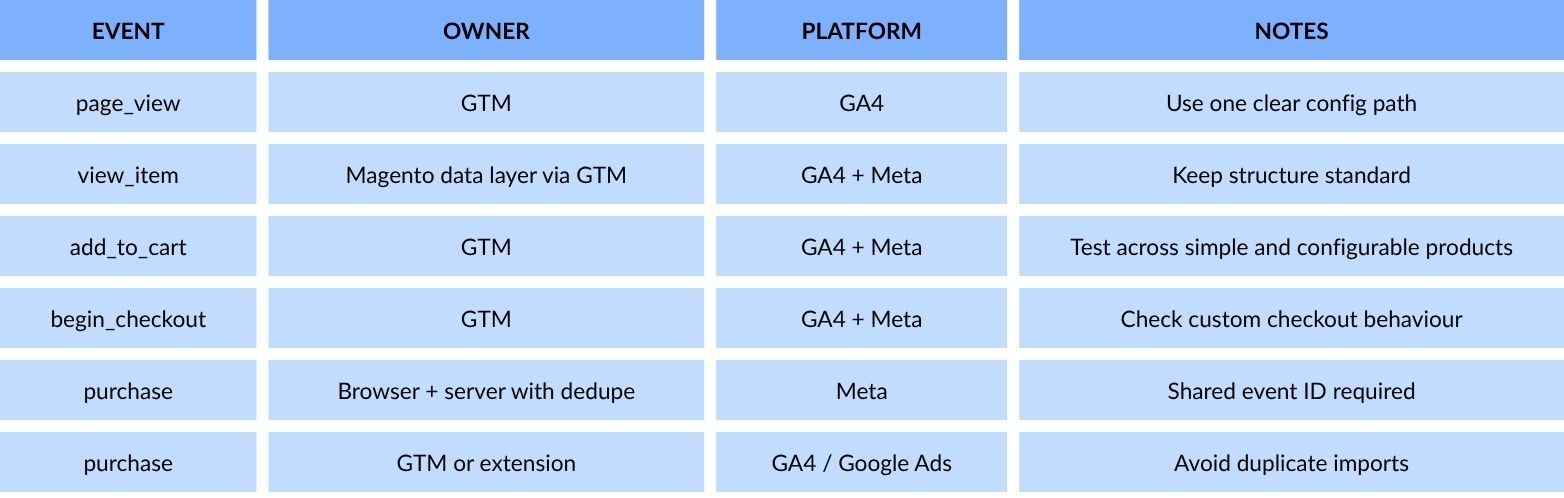
3. Strengthen Meta event reliability
Meta event quality should be stable enough to support optimisation and reporting. A browser and server setup can help, but only if it is configured carefully and deduplicated properly. The aim is to protect signal quality, not inflate conversion counts.
4. Bring feed and site reviews into one process
Marketing, ecommerce, and operations teams should review feed issues together. Price, stock, delivery messaging, promotional text, variants, and landing page behaviour all need to align. This reduces the chance of platform issues caused by internal disconnects.
5. Make trust information obvious
Do not bury key business details. Contact information, shipping terms, returns, refunds, privacy, and company details should be easy to find and easy to understand. Clear trust signals help both customers and platforms feel more confident in the store.
6. Review access and account governance
Check who has access to Meta assets, which domains are connected, which ad accounts are linked, and which old integrations still remain active. These areas are often ignored because they sit outside daily campaign work, but they still shape risk and data quality.
7. Build a monthly review routine
A simple monthly review can catch slow drift before it becomes a larger issue. That review should include tracking checks, feed checks, consent testing, policy page checks, and order validation against reported conversions. Good routines reduce panic and improve store stability.
A Practical Magento Audit Checklist for Marketing Teams
A useful Magento audit should check live experience, data accuracy, and trust signals together. Looking at one area alone leaves blind spots that platforms may still catch.
Tracking
- GA4 purchase fires once only
- Google Ads conversions align with your chosen source of truth
- Meta purchase events are deduplicated correctly
- Order value, tax, and currency are accurate
- Refunds or cancellations are considered in reporting
Consent
- Banner appears correctly by region
- Default consent states are in place
- No ad tags fire too early
- Consent choice persists across the site
- Live testing confirms expected behaviour
Feed and Landing Pages
- Prices match
- Availability matches
- promotional wording matches
- Product images match the item sold
- Variant URLs resolve correctly
- No canonical or parameter confusion affects page quality
Business Trust
- Contact details are easy to find
- Policy pages are clear and current
- Delivery times are realistic
- Return terms are easy to understand
- Company identity is consistent across the site
Asset Control
- Meta pixel permissions are reviewed
- Old users or unused assets are removed
- Google account links are checked
- Verified domain status is current
- Access is limited to active and relevant users only
Common Mistakes That Quietly Increase Risk

Most meta and google risk builds slowly. Small gaps across tracking, trust, and feed quality often do more damage over time than one obvious technical failure.
Mistake #1: Treating warnings as isolated
A Merchant Center warning, a Meta event problem, and a GA4 discrepancy often connect back to the same source issue. Teams lose time when they treat each alert as a separate task instead of reviewing the full setup. A wider look usually shows the problem sits in tracking logic, feed accuracy, or trust signals on the site.
Mistake #2: Letting extensions pile up
Magento stores often collect plugins over time without reviewing overlap. That can leave several tools trying to manage the same data or event paths in slightly different ways. The result is a setup that becomes harder to trust and harder to debug.
Mistake #3: Trusting platform numbers without checking Magento orders
Ad platform reporting is useful, but it should not be treated as final truth on its own. If conversion numbers are not compared against actual Magento orders, the business can end up making poor budget or performance decisions. Cross-checking reported sales against the store remains one of the simplest controls available.
Mistake #4: Forgetting non-product pages
Many stores spend time on category and product pages while leaving delivery, returns, privacy, and contact pages weak or outdated. Those pages still influence trust because they explain how the business works after checkout. A good catalogue experience loses value when core business information feels vague or hidden.
Mistake #5: Using temporary feed fixes as permanent solutions
Feed rules can be helpful in the short term, but they do not replace clean Magento product data. If the source data stays messy, the same issue usually returns in another form later. Long-term stability comes from fixing the catalogue and site setup rather than endlessly patching symptoms.
Conclusion
Meta and google risk falls when a Magento store is consistent, transparent, and well managed. Get consent right, assign clear ownership to tracking, keep feed data aligned with the site, make trust signals easy to find, and review the setup regularly. That gives Meta and Google stronger reasons to trust the store and gives your team a safer platform for growth in 2026.
- By 5ms