
Magento support services help ecommerce teams keep stores secure, stable, and ready to trade. For ecommerce leaders, support is not only about fixing bugs when they appear. It is about reducing risk, improving release confidence, and keeping the platform in a strong enough position to support growth.
This guide covers what good support should include, how Magento support plans are usually structured, what unmanaged sites risk, and how to compare partners properly.
What Are Magento Support Services?
Magento support services are ongoing technical services that help keep a Magento or Adobe Commerce store secure, updated, functional, and commercially reliable.
They often include maintenance, issue resolution, security patching, monitoring, release support, performance work, and support for third-party integrations.
Why Do They Matter To Ecommerce Leaders?
Support affects far more than the development queue. It affects conversion, reporting confidence, release speed, customer experience, and how quickly the business can respond when revenue is at risk.
A store may look stable on the surface, but if patching is delayed, integrations are fragile, and no one owns the release process, risk builds quietly in the background.
What Is The Difference Between Support And Simple Development Help?
A developer can fix a bug. A support partner should give you a working model for ongoing platform care.
That means clear priorities, response expectations, testing, change control, and a better view of what needs attention next.
What Is Included In Magento Support?
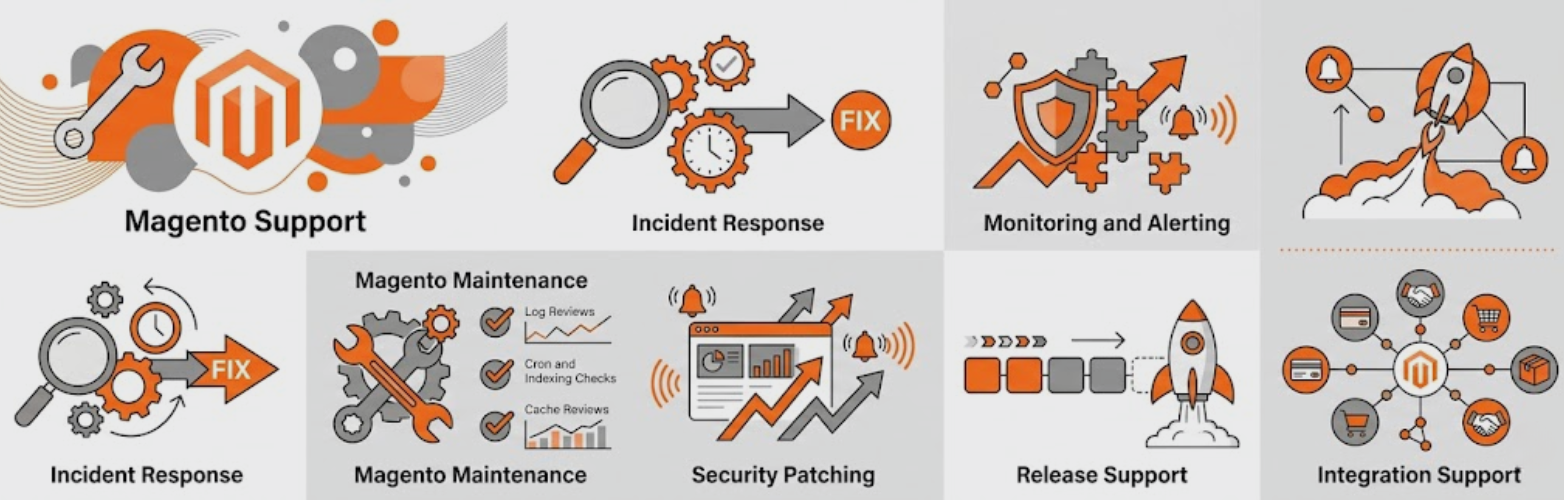
Good Magento support services usually include incident handling, Magento maintenance, platform updates, security patching, release support, monitoring, and technical guidance.
Stronger plans go further and include proactive reviews, better SLA coverage, support for integrations, and regular prioritisation.
Incident Response
If checkout stops working, payment errors appear, or the admin becomes unstable, your support team should be able to step in quickly.
That means clear severity levels, a named escalation route, and a process for keeping stakeholders updated while the issue is being handled.
Magento Maintenance
Magento maintenance covers the recurring technical work that keeps the platform in usable condition.
This usually includes:
- Log Reviews
- Cron and Indexing Checks
- Extension Checks
- Cache Reviews
- Platform Housekeeping
- Routine Technical Fixes
Security Patching
Security patching should be part of the core service, not an occasional extra.
Adobe publishes security guidance and update best practice for Commerce, which means stores need ongoing attention rather than one-off setup. A support partner should have a repeatable process for reviewing patches, planning updates, testing changes, and reducing exposure.
Monitoring And Alerting
Support should not depend on customers being the first people to spot a problem.
Monitoring should cover:
- Site Uptime
- Cron Failures
- Error Spikes
- Queue Issues
- Unusual Slowdowns
- Failed Integrations
Release Support
Release support is one of the most useful parts of a good plan, yet it is often underexplained.
A proper release process should include staging checks, test plans, deployment controls, rollback preparation, and post-release validation.
Integration Support
Magento stores often depend on payment platforms, ERPs, PIMs, search tools, email systems, shipping apps, and feeds.
Support should include help diagnosing issues across that wider stack, not only within Magento itself.
Why Do Unmanaged Magento Sites Create Risk?
An unmanaged Magento store can keep trading while hidden issues build in the background.
Then one failed update, one unsupported extension, or one weak deployment process turns a manageable issue into a revenue problem.
Delayed Security Updates
When no one owns security reviews and patch planning, vulnerabilities stay open for longer.
Adobe’s documentation makes clear that update and security processes need active management, especially on ecommerce platforms handling customer and payment journeys.
Version Drift
Magento core, PHP, extensions, and custom modules all need to stay compatible.
If updates are delayed for too long, the eventual upgrade becomes harder, more expensive, and more disruptive.
Poor Incident Recovery
Without clear contacts, documented access, and a triage process, simple issues can take too long to diagnose.
This often leads to lost revenue, slower decisions, and internal frustration during urgent incidents.
Weak Release Confidence
When previous changes have caused problems, teams start avoiding necessary updates.
That creates a bad cycle where risk grows because nobody feels comfortable releasing improvements.
Broken Reporting And Tracking
Support gaps often show up in analytics and tracking too.
A theme update, checkout change, or app conflict can break data collection, which leaves leadership making decisions on numbers they no longer trust.
What Does Good Magento Maintenance Look Like In Practice?

Good Magento maintenance follows a regular operating rhythm. It is not simply a reactive inbox.
It should help the business stay ahead of issues rather than continually catching up after things go wrong.
Monthly Platform Health Checks
A strong monthly maintenance cycle should include checks across the main technical areas of the store.
That often means reviewing:
- Error Logs
- Cron Jobs
- Indexing
- Caching
- Database Health
- Extension Behaviour
- Admin Performance
Security Reviews
Security work should sit inside a recurring review process.
That includes looking at available patches, extension risks, admin access, and any known exposure points. Adobe’s best-practice guidance supports that structured approach.
Backup And Rollback Readiness
Backups need to be more than a box ticked in hosting.
Adobe advises backing up the project before upgrades and significant changes. Good support should also include rollback planning, so releases are not pushed live without a recovery route.
Performance Reviews
Performance checks should look at slow templates, heavy scripts, frontend changes, and real-world user experience.
Google recommends achieving good Core Web Vitals because they reflect how pages load, respond, and remain visually stable for users.
Commercial Journey Testing
The most important journeys should be checked regularly, especially after changes.
That often includes:
- Product Pages
- Basket Updates
- Checkout Steps
- Payment Methods
- Promo Code Logic
- Shipping Selections
- Confirmation Pages
- Transactional Emails
What SLA Should You Expect From Magento Support Plans?
A support SLA should define how quickly the provider responds, how incidents are prioritised, when support is available, and how communication will work during an issue.
It should be specific enough that your team knows exactly what to expect during both business hours and urgent out-of-hours incidents.
A Sensible Priority Structure
A useful Magento SLA often follows four priority levels.
Priority 1: Site down, checkout down, or payment failure affecting revenue.
Priority 2: Major feature broken or serious issue affecting trade.
Priority 3: Important bug that does not stop the whole site from functioning.
Priority 4: Minor bug, cosmetic issue, or low-risk request.
Typical Response Expectations
A sensible framework often looks like this:
Priority | Example | First Response Target |
P1 | Site outage or checkout failure | 15 to 30 minutes |
P2 | Major trading issue | 1 hour |
P3 | Standard bug | Within a few business hours |
P4 | Minor issue or request | 1 business day |
What Else Should The SLA Cover?
A good SLA should also explain:
- Support Hours
- Emergency Escalation
- Update Frequency During Incidents
- Who Owns Hosting Issues
- Who Approves Urgent Changes
- How Third-Party Suppliers Are Handled
- What Happens During Peak Trading Periods
How Do Magento Support Packages Usually Work?
Magento support packages are usually sold as ad hoc hours, rolling retainers, tiered monthly plans, or fully managed support arrangements.
The main difference between them is not only time. It is the level of ownership, prevention, and response built into the service.
Ad Hoc Support
This suits stores with low change volume or short-term requirements.
It can work for simple needs, but it often comes with slower access, less context, and less proactive care.
Entry-Level Retainers
These plans are usually aimed at smaller stores that need ongoing Magento maintenance and occasional support.
They often include a monthly block of hours, basic monitoring, and business-hours support.
Growth Retainers
This is often a better fit for active ecommerce teams.
These plans usually include stronger SLAs, more hours, release support, ongoing maintenance, and better support across integrations and trading changes.
Managed Magento Support
Managed Magento support is the broadest option.
It usually includes proactive monitoring, incident handling, planning, release governance, upgrade support, and senior technical oversight rather than simple ticket fulfilment.
What Should Be Included In Managed Magento Support?
A managed plan should give your business a working support model.
It should show how the provider will protect the platform, handle change, and reduce technical risk over time.
Onboarding And Audit
A good managed plan should begin with onboarding.
That should include:
- Access Reviews
- Codebase Review
- Extension Assessment
- Environment Review
- Risk Identification
- Priority Recommendations
Ongoing Maintenance And Support
The core delivery should cover:
- Issue Resolution
- Magento Maintenance
- Patch Planning
- Monitoring
- Release Support
- Technical Advice
Governance And Planning
This is often the difference between average support and strong support.
The plan should include:
- Monthly Prioritisation
- Open Risk Visibility
- Roadmap Input
- Reporting on Work Completed
- Clear Ownership of Next Steps
How Should Ecommerce Leaders Compare Magento Support Partners?
Support partners should be compared on depth, process, and commercial fit.
Low fees and broad promises do not tell you much on their own.
Ask How They Handle Incidents
A strong answer should explain severity levels, response expectations, escalation paths, and who gets involved when the issue is urgent.
Ask What Proactive Work Is Included
If the service sounds mostly reactive, you are probably buying development capacity rather than a true support function.
Ask About Security Process
A provider should already have a patching and security review process in place. Adobe’s own guidance supports the need for active security management across Commerce environments.
Ask About Release Process
Ask what happens before, during, and after a release.
That should include staging checks, testing, rollback planning, and live validation.
Ask Who Will Actually Work On The Site
You should know whether your account will be handled by experienced Magento specialists or passed through a generic support layer first.
Ask How They Report On Work
You should be able to see:
- What Was Fixed
- What Risks Were Found
- What Remains Open
- Where Time Was Used
- What Needs Priority Next
Which Red Flags Should You Watch For?
Some support packages sound attractive until you look closely at what is missing.
The problems usually show up in the details.
Warning Signs In The Service Model
Watch for:
- No Defined SLA
- No Monitoring
- No Onboarding Audit
- No Backup or Rollback Process
- No Release QA
- No Security Process
- No Named Escalation Route
Warning Signs In Delivery
Watch for:
- Unclear Ownership
- Poor Communication During Incidents
- No Proactive Recommendations
- No Commercial Understanding of Ecommerce Risk
- No Visibility on Who Is Doing the Work
How Much Support Does Your Store Probably Need?
The right support level depends on complexity, change frequency, revenue dependence, and internal capability.
A simple store with few integrations does not need the same model as a revenue-critical operation with multiple payment methods and regular releases.
Light Support
This is often enough for a smaller store with low change volume and limited customisation.
The focus is usually basic maintenance and help when issues appear.
Standard Support
This suits businesses running regular campaigns, content changes, and minor development work.
It usually needs faster response times and better release support.
Advanced Support
This is more suitable for stores with custom functionality, deeper integrations, or heavier operational dependence.
These stores usually need stronger SLAs and more proactive work.
Fully Managed Support
This suits businesses that need ongoing technical ownership, senior oversight, and a partner that helps guide the platform rather than simply reacting to tickets.
What Should Happen During Onboarding?
Onboarding is one of the most important stages in Magento support.
It sets the tone for how quickly the provider can spot risk, understand the store, and start delivering useful work.
Access And Environment Review
The provider should review hosting, code repositories, deployment tools, CDN setup, Magento admin access, analytics tools, and connected platforms.
Without this, support often starts slowly and stays reactive.
Technical Audit
A structured technical review should look at:
- Magento Version
- PHP Version
- Extension List
- Custom Code
- Theme Setup
- Environment Structure
- Obvious Support Risks
Commercial Journey Review
The provider should review the customer journey, not only the codebase.
That includes navigation, product discovery, basket behaviour, checkout, confirmation pages, and key customer emails.
Risk Register And Action Plan
A useful onboarding process should end with a prioritised action plan.
That gives the business a clear view of:
- Urgent Issues
- Medium-Term Risks
- Maintenance Priorities
- Recommended Next Steps
How Does Magento Support Affect SEO, CRO, And Paid Performance?
Magento support has a direct effect on marketing performance.
Slow templates, broken schema, unstable checkout flows, or faulty feeds can damage channel efficiency long before someone labels it a support issue.
SEO Impact
Technical support helps protect crawlability, site speed, structured data output, and page stability.
Performance also matters here. Google’s Core Web Vitals guidance reinforces the importance of a fast and stable user experience.
CRO Impact
Support affects conversion when checkout logic, shipping rules, voucher codes, or page speed create friction.
A small bug can weaken conversion for days if nobody spots it quickly.
Paid Media Impact
Support also affects paid performance through landing page speed, product feed reliability, tracking accuracy, and the health of post-click journeys.
When support is weak, ad spend often becomes less efficient because the site experience is unstable.
What Should A Support Tier Comparison Include?
If the goal is to help buyers compare plans clearly, the comparison needs to focus on what changes between tiers in practical terms.
That is more persuasive than generic wording about “premium support”.
Suggested Support Tier Comparison Fields
Feature | Light | Standard | Advanced | Managed |
Included hours | Yes | Yes | Yes | Yes |
Business-hours support | Yes | Yes | Yes | Yes |
Emergency support | No | Limited | Yes | Yes |
Defined SLA | Basic | Yes | Strong | Strong |
Monitoring | Basic | Yes | Advanced | Advanced |
Security patching | Partial | Yes | Yes | Yes |
Release QA | Limited | Yes | Yes | Yes |
Technical lead | No | No | Yes | Yes |
Proactive recommendations | Limited | Yes | Yes | Yes |
Peak trading support | No | Limited | Yes | Yes |
Why This Comparison Helps
This kind of comparison helps ecommerce leaders match support level to real business need.
It also makes it easier to see the difference between simple maintenance and fully managed Magento support.
What Should Ecommerce Leaders Ask Before Signing?
The right questions help expose the difference between a basic support package and a properly managed service.
This is where many decisions become much easier.
Questions Worth Asking
Ask:
- What is included each month beyond ticket handling?
- How are incidents prioritised?
- What does onboarding look like?
- How do you handle security patches?
- What is your release process?
- How do you support rollback if a release fails?
- What monitoring is included?
- How do you test checkout after changes?
- How do you report on work and risk?
- Who will actually work on the account?
- How do you support peak trading periods?
- How do you balance maintenance work with growth requests?
Compare Magento Support Tiers
Choosing between light support, a monthly retainer, or fully managed Magento support becomes much easier when you compare response times, proactive maintenance, release support, and technical ownership side by side.
A strong support tier comparison should help teams understand what level of service fits their store, their trading risk, and their internal capability.
Frequently Asked Questions
Q1. What Is Included In Magento Support?
Magento support usually includes maintenance, issue resolution, security patching, updates, monitoring, release support, and technical guidance. Higher tiers often include proactive reviews, stronger SLAs, and more technical ownership.
Q2. What Is The Difference Between Magento Maintenance And Magento Support?
Magento maintenance covers routine platform care such as updates, checks, and housekeeping. Magento support is broader and also includes incident response, troubleshooting, release help, and prioritisation.
Q3. Do I Need Managed Magento Support?
Managed Magento support suits stores with regular releases, important integrations, strong revenue dependence, or limited internal technical ownership. It is a better fit when the business needs prevention and structure, not only helpdesk support.
Q4. What Should A Magento SLA Include?
A Magento SLA should include response times by priority, support hours, emergency escalation, communication standards, and a clear view of responsibility across site, hosting, and third-party systems.
Q5. What Risks Come With An Unmanaged Magento Site?
Common risks include delayed patching, extension conflicts, broken checkout journeys, slower recovery during incidents, weak release confidence, and unreliable reporting.
Q6. How Do Magento Support Packages Usually Work?
Most Magento support packages are sold as ad hoc hours, monthly retainers, tiered plans, or fully managed support. The main differences are proactive work, SLA strength, included hours, and technical ownership.
Q7. How Do I Compare Magento Support Partners?
Compare providers on onboarding, patch management, monitoring, release process, reporting, team quality, and how much proactive support is included. Day rate alone rarely shows the real value.
Q8. Should Magento Support Include Performance And SEO Support?
Yes. Good support should include performance visibility and technical help with issues that affect speed, crawlability, feeds, checkout stability, and conversion.
Final Thoughts On Magento Support Services
Magento support services help ecommerce teams keep their stores secure, stable, and ready for growth. Strong support gives you faster issue resolution, clearer technical ownership, safer releases, and more confidence in day-to-day trading, especially when your site depends on regular campaigns, complex integrations, and steady conversion performance.
The right support model should do more than fix problems as they happen. It should help reduce risk, improve performance, and make future growth easier to manage. If you want Magento support that combines technical reliability with commercial thinking, 5MS can help.
Visit 5MS to see how our support services can strengthen your store.
- By 5ms