
UX design is the practice of making a website easy, clear and pleasant to use, and on an online store it is one of the biggest levers you have on conversion. If shoppers cannot find what they want, do not trust the page, or hit friction at the checkout, they leave, and no amount of ad spend fixes that. This guide explains what UX design actually is in plain English, how it differs from UI, and how better UX design turns more of your existing traffic into sales.
It is written for store owners and marketers, not designers, so you can spot where your own site is losing sales and know what good looks like. At 5MS we design and optimise eCommerce stores for conversion, not just looks.
Average cart abandonment rate
Baymard Institute
Potential return per £1 in UX
Forrester estimate
Pillars of good eCommerce UX
Covered below
Target page load, speed is UX
Best practice
UX design (user experience design) is the practice of making a product easy, clear and satisfying to use. On an eCommerce store, it covers how shoppers find products, understand them, trust the site and get through checkout. It is not the same as UI design, which is how the site looks; UX is how it works. Good UX design lifts conversion because it removes friction, so the same traffic produces more sales. The five pillars to get right are usability, clarity, speed, trust and accessibility.
What Is UX Design, Really?
UX design, short for user experience design, is the practice of shaping how it feels to use a product so that it is easy, clear and satisfying. On a website it covers everything a visitor does: how they navigate, how they find and understand products, whether they trust what they see, and how smoothly they reach the goal, which on an online store is a purchase. Good UX design is largely invisible; you only notice it when it is missing and something feels awkward.
A useful way to think about it: UX design is about removing friction and answering the shopper’s questions in the right order, so nothing gets in the way of them buying. Every extra click, every confusing label, every slow page and every moment of doubt is a leak, and UX design is the discipline of finding and sealing those leaks.
Because UX design decides how much of your traffic converts, it sits right next to pricing and marketing as a driver of revenue, not off to the side as decoration.
UX Design vs UI Design: The Difference
People use UX and UI interchangeably, but they are different jobs. UX is how the site works; UI is how it looks. You need both, and great UI on top of poor UX just makes a frustrating store look nice.
In practice the two overlap and a good team does both together. But if you have to prioritise, fix the UX first: a clear, frictionless journey in a plain design will out-sell a beautiful design that is confusing to use.
The 5 Pillars of Good eCommerce UX Design
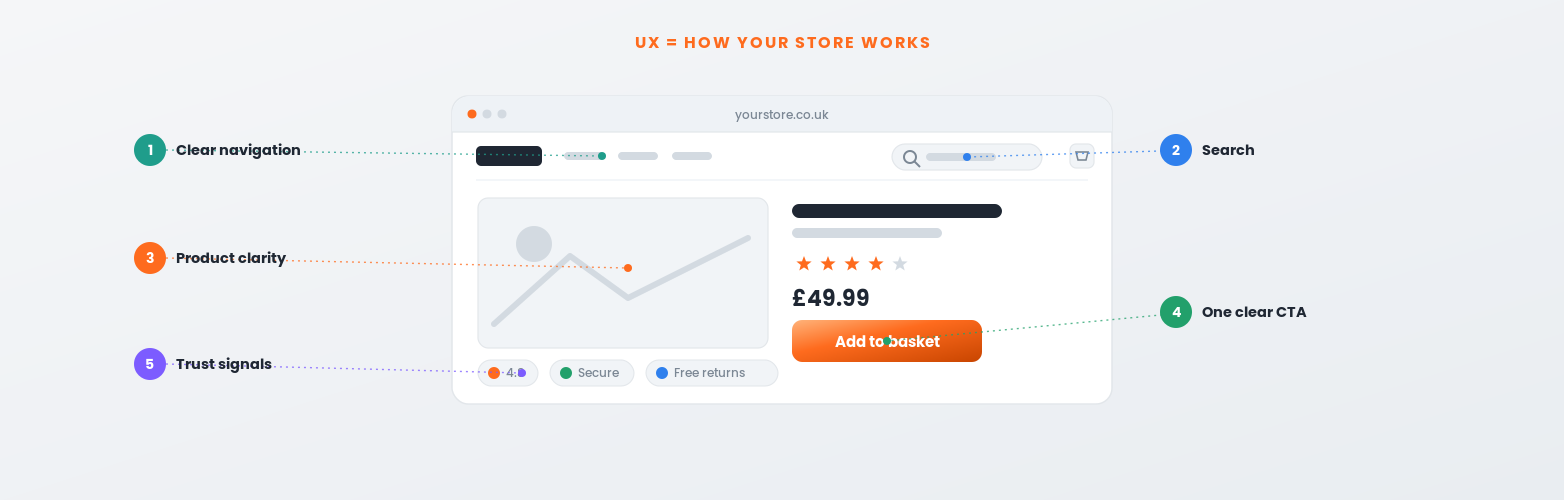
Strong eCommerce UX design comes down to five things done well. Weak on any one and shoppers leak away before they buy.
Shoppers can complete tasks, find, choose, buy, without thinking or getting stuck.
The most important information and actions are obvious, in the right order, on every page.
Fast pages, because slow loading is friction and every extra second costs conversions.
Reviews, clear policies, secure checkout and honest content that reassure shoppers it is safe to buy.
Usable for everyone, on any device, which widens your market and is increasingly a legal expectation.
How UX Design Drives Conversions
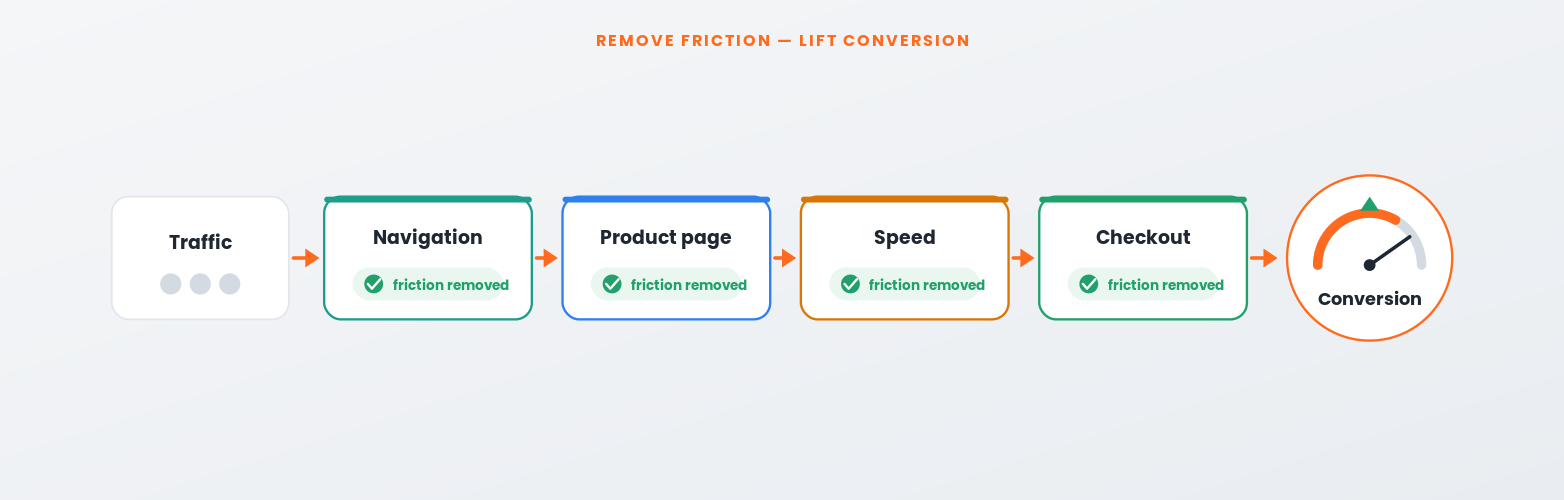
Conversion is simply the percentage of visitors who buy, and UX design is one of the most direct ways to improve it. Because you are working with traffic you already have, a UX improvement often pays back faster than spending more on ads. The Baymard Institute puts average documented cart abandonment at around 70%, much of it caused by avoidable friction, which is exactly what UX design removes.
The mechanism is straightforward. Clearer navigation gets more shoppers to the right product; better product pages answer the questions that cause hesitation; a faster site loses fewer people; and a simpler checkout recovers sales that would otherwise be abandoned. That is why UX design and conversion rate optimisation are two sides of the same coin, and why speed, covered in our guide to eCommerce site speed, is treated as a UX issue, not just a technical one.
UX Design Examples for eCommerce
Here is what good UX design looks like on the pages that matter most, and where stores commonly lose sales.
For a deeper, page-by-page treatment of getting these right, see our eCommerce UX pillar guide. If you want the underlying principles, the Nielsen Norman Group is the authority on UX fundamentals.
A Quick UX Design Self-Audit
Run your own store through this on desktop and mobile. Every “no” is a place UX design could be winning you more sales.
What Is UX Design, in Short
UX design (user experience design) is the practice of making a product easy, clear and satisfying to use. On an eCommerce store it covers how shoppers navigate, find and understand products, trust the site and get through checkout, in short, how the site works, as opposed to UI design, which is how it looks. Good UX design lifts conversion by removing friction, so the same traffic produces more sales, which is why it often pays back faster than extra ad spend. The five pillars to get right are usability, clarity, speed, trust and accessibility, and the pages that matter most are product pages, navigation and search, checkout and mobile.
Frequently Asked Questions
Common questions about UX design for eCommerce. Get in touch if yours is not here.
What is UX design in simple terms?
UX design, or user experience design, is the practice of making something easy, clear and pleasant to use. For an online store it means shaping the whole journey, navigation, product pages, trust signals and checkout, so shoppers can find what they want and buy it without friction. In short, it is about how the site works, not how it looks.
What is the difference between UX and UI design?
UX design is how a site works, its structure, flow, usability and journeys. UI design is how it looks, the colours, typography, buttons and spacing. You need both, but they are different jobs. Great UI on top of poor UX just makes a frustrating store look nice, so it is usually best to fix the UX first.
Does UX design really improve conversion rates?
Yes. UX design removes the friction that makes shoppers abandon, and cart abandonment averages around 70%, much of it avoidable. Because you are improving how existing traffic converts rather than buying more traffic, UX work often delivers a strong return, and an often-cited Forrester estimate puts it as high as £100 back for every £1 invested.
What are the pillars of good eCommerce UX design?
Five: usability (tasks are easy to complete), clarity and hierarchy (the important things stand out), speed (fast pages), trust and credibility (reviews, clear policies, secure checkout) and accessibility (usable for everyone, on any device). Weakness in any one of them leaks sales, so a good UX design covers all five.
Is site speed part of UX design?
Yes. Speed is a core part of UX because slow pages are friction: every extra second of load time costs conversions and frustrates shoppers, especially on mobile. Treating performance as a UX issue rather than a purely technical one is one of the highest-impact changes most stores can make.
How do I know if my store has a UX problem?
Look for the symptoms: high bounce or exit rates on key pages, a low add-to-basket or checkout completion rate, lots of site searches with no clicks, or heavy cart abandonment. Watching real session recordings and running the self-audit above will quickly show where shoppers get stuck. Those stuck points are your UX priorities.
Is UX design the same as CRO?
They are closely related but not identical. UX design is the broad discipline of making the experience good; conversion rate optimisation is the focused, data-led practice of testing changes to lift conversion. Good CRO is grounded in good UX, and the two work best together, UX sets the foundation, CRO refines and proves what works.
Should I hire a UX designer or an agency?
For a one-off improvement a freelancer can work; for ongoing, results-focused UX and conversion work an agency usually gives you the mix of design, development and analytics under one roof. At 5MS our eCommerce services design and build UX with conversion, not just aesthetics, as the goal.
Related Reading
CROConversion rate optimisation explained
SpeedWhy site speed is a UX and sales issue
Sources: Baymard Institute cart abandonment data and Nielsen Norman Group on UX. UX ROI figures are third-party estimates, verify before quoting.
By the 5MS team, UK eCommerce agency and Adobe Solution Partner. Last updated: August 2026.