
You cannot grow what you cannot measure, and most stores measure the wrong things or trust numbers they have not checked. Good eCommerce analytics turns a fog of dashboards into a clear picture of what is working, what is leaking and what to do next. Get it right and every decision becomes a measured bet instead of a hunch. Get it wrong and you scale in the dark, spending on channels that look profitable in one report and lose money in another.
This pillar guide covers how to set up eCommerce analytics properly: GA4 for eCommerce, Magento reporting, attribution that reflects reality, the metrics that matter at each business stage, and the reporting cadence that turns data into growth. It is the measurement layer that steers your whole growth strategy.

Mobile vs desktop conversion gap to track
~2.9% vs ~3.9%
Average cart abandonment to monitor
Baymard
Healthy LTV to acquisition cost ratio
Benchmark
Core eCommerce events to track in GA4
View, add, checkout, purchase
To set up eCommerce analytics, start with GA4: create a property, install it through Google Tag Manager, and track the four core eCommerce events, view item, add to cart, begin checkout and purchase, with product and revenue data. Use your platform’s own reporting, such as Magento’s sales reports, as the financial source of truth, and reconcile the two. Choose an attribution model that reflects the full journey rather than last click, focus on the metrics that matter at your stage, and review them on a fixed cadence. Done properly, analytics becomes the control system that steers profitable growth.
eCommerce analytics is the practice of collecting, trusting and acting on the data your store produces: where visitors come from, what they do, where they drop off, and what they are worth. It is not the dashboard itself, and it is not a monthly screenshot of traffic. It is the discipline of turning raw events into decisions, so you know which changes to make and can prove whether they worked.
Most stores fall down in one of two ways. Either the tracking is broken, so the numbers are wrong and nobody quite trusts them, or the tracking works but the team drowns in metrics that never change a decision. Both leave you guessing. Reliable, well-chosen analytics does the opposite: it tells you your mobile conversion is lagging desktop, that a checkout step is leaking, or that a channel that looks profitable is actually being over-credited.
That is why analytics is the control system for growth. Every other lever, conversion, email, paid media, retention, depends on measurement to steer it. Set it up once, properly, and it pays back on every decision you make afterwards. The rest of this guide is how to do that.
It also helps to be clear about what analytics is not. It is not about hoarding every possible data point, and it is not about the prettiest dashboard. A store tracking fifty metrics that nobody acts on is worse off than one tracking five that drive weekly decisions, because the noise hides the signal. Good analytics is deliberately selective: it collects what you need to make specific decisions, checks that the data is accurate, and presents it simply enough that the next action is obvious. Everything that follows, from the GA4 setup to the reporting cadence, is built on that principle of measuring less but trusting it more.
Google Analytics 4 is the free, near-universal foundation, and since it replaced Universal Analytics it works on an event-based model, everything a user does is an event. For a store, the priority is getting the eCommerce events firing accurately, because those power almost every report that matters. The essential setup:
Set up a GA4 property and deploy it through Google Tag Manager rather than hard-coding it. GTM makes it far easier to manage the eCommerce events, add new tags and debug without touching the theme each time.
Implement view_item, add_to_cart, begin_checkout and purchase, each with the full item and revenue data via the data layer. These four events feed the funnel, product and revenue reports, so if they are wrong, everything downstream is wrong.
Set purchase as a key event (conversion), then link Google Ads and Search Console so acquisition and search data flow in. This is what lets you see which campaigns and queries actually drive revenue, not just clicks.
Test every event in GA4 DebugView and reconcile purchases against real orders before you trust the data. Implement a consent banner and Google Consent Mode so tracking is lawful under UK GDPR and PECR without needlessly losing data.
The most common analytics failure is untested tracking. If your GA4 purchases do not roughly match your real orders, fix that before reading a single report, because every decision built on broken data is a guess wearing a suit.
GA4 is excellent for behaviour and acquisition, but it is a sampled, cookie-and-consent-limited view. For the actual money, your platform is the source of truth. Magento and Adobe Commerce carry rich native reporting, sales and tax reports, best sellers, ordered products, abandoned carts and customer order history, drawn straight from the order database, so the figures reconcile to the penny.
The right approach is to use both and know which to trust for what. Read financial truth, revenue, refunds, margins, tax, from Magento. Read behaviour and attribution, traffic sources, funnel drop-off, device splits, from GA4. When the two disagree on revenue, Magento wins, and the gap usually points to a tracking problem in GA4 worth fixing. For deeper analysis, many stores pipe Magento order data into a warehouse or BI tool alongside GA4 and ad-platform data.
Keeping this stack accurate, tracking, extensions, data layer and consent, is ongoing technical work that quietly underpins every decision. It is exactly the kind of thing our Magento support team maintains, so the numbers you plan around are numbers you can trust.
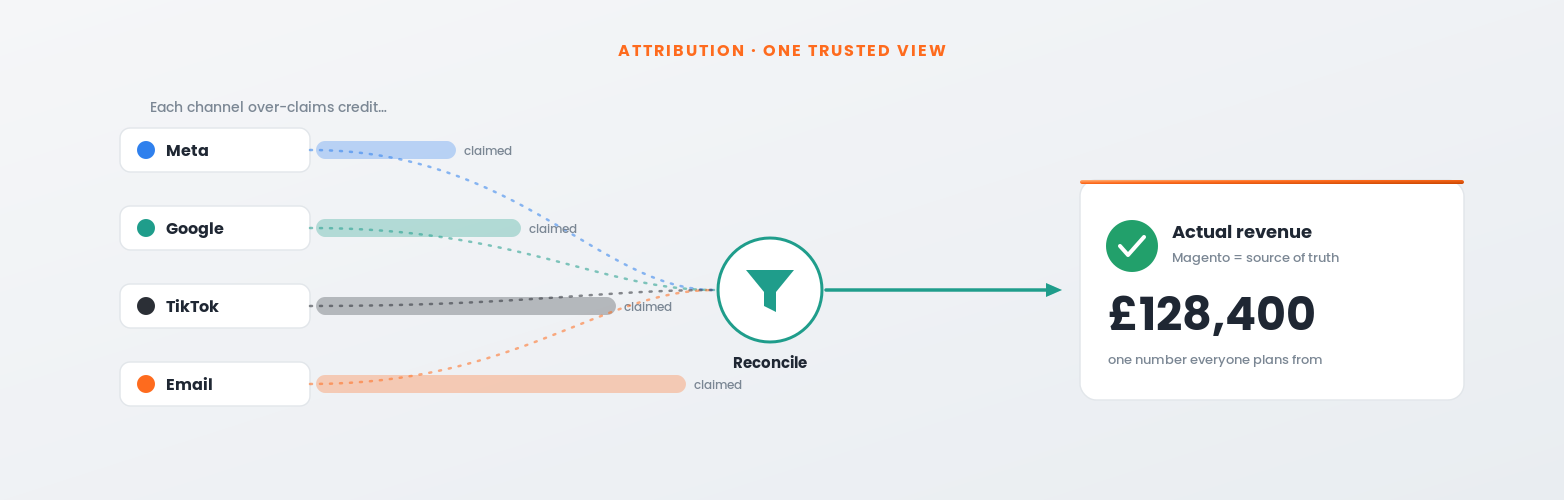
Attribution is how you decide which channel gets credit for a sale, and it is where most stores fool themselves. A customer might discover you on TikTok, research on Google, and buy after an email. Last-click attribution hands all the credit to that final email and none to the discovery that made it possible, so you under-invest in the channels that actually start the journey and over-invest in the ones that merely finish it.
GA4 defaults to a data-driven attribution model that spreads credit across the touchpoints using your own conversion data, which is a better reflection of reality than last click for most stores. Just as importantly, treat the numbers reported inside ad platforms with caution: Meta, Google and TikTok each claim credit generously and their totals routinely exceed real revenue. Reconcile platform-reported returns against GA4 and, above all, against actual Magento revenue.
You do not need perfect attribution, which does not exist, but you do need consistent, honest attribution you use the same way every time. Pick a model, understand its bias, cross-check against blended figures (total revenue divided by total spend), and make decisions on the trend rather than any single platform’s flattering self-report. This directly steers how you allocate paid media spend.
Not every metric matters at every stage. Tracking dozens of numbers from day one is a recipe for paralysis. Focus on the few that match where your business actually is, and add more only as they become decisions you need to make.
| Stage | Focus on | Because |
|---|---|---|
| Early / launch | Conversion rate, revenue per session, cart abandonment | Prove the store converts before spending on traffic |
| Growth | Channel CAC, LTV:CAC, email-attributed revenue, device splits | Find and fund the profitable acquisition channels |
| Scale | Cohort retention, contribution margin, blended ROAS, LTV by segment | Protect profitability and retention as volume grows |
Whatever the stage, favour metrics that point to an action over ones that only flatter. We cover the specific set to prioritise in our companion guide to the eCommerce KPIs that actually matter, from the mobile conversion gap to the lifetime value to acquisition cost ratio. Analytics exists to drive the decisions behind a sound conversion and growth programme, not to fill a dashboard.
Data only creates value when someone looks at it on a rhythm and acts. A reporting cadence is simply a fixed schedule for reviewing the right numbers at the right frequency, with an owner and a next action for each. The practical structure most stores can run:
Keep the reports simple and consistent so you compare like with like over time, and always end each review with decisions, not just observations. This closed loop, measure, decide, act, measure again, is what turns analytics from a cost into a compounding advantage. Over months, the compounding is real: each cycle sharpens the next, because you already know which changes worked and which did not, so you waste less effort on guesses and more of your time on proven wins. It is the backbone of every growth programme we run.
Most analytics problems are not exotic; they are the same handful of mistakes repeated across thousands of stores. Knowing them in advance is the cheapest way to keep your data honest and your decisions sound. These are the ones we see most often, and the fix for each.
Trusting untested tracking. Tags break silently after theme changes, app updates or a checkout tweak, and nobody notices until the numbers look odd. Validate events in GA4 DebugView, reconcile purchases against real orders, and re-check after every significant site change.
Believing platform-reported ROAS. Each ad platform over-credits itself, so the totals add up to more revenue than you actually made. Judge spend on blended return and real Magento revenue, not the flattering number inside each ad account.
Building dashboards nobody acts on. A report full of metrics that never change a decision is decoration. Cut it back to the numbers tied to your stage, give each an owner, and make every review end in an action.
Ignoring consent and data loss. A blunt cookie banner or missing Consent Mode can silently discard a large share of your data, quietly skewing every report. Implement consent properly so tracking is both lawful and as complete as it can be.
Having no single source of truth. When three tools report three different revenue figures, teams argue instead of act. Agree that Magento is the financial truth and GA4 is the behaviour view, and reconcile to that, so everyone plans from the same numbers.
Avoid these five and you are ahead of most stores before you have analysed a thing, because your data will actually be trustworthy. Accurate measurement is not glamorous, but it is the difference between a growth plan built on evidence and one built on hope. If you would like a second pair of eyes on your setup, our team audits tracking, attribution and reporting as a standard first step.
To set up eCommerce analytics, start with GA4: create a property, deploy it through Google Tag Manager, and track the four core eCommerce events, view item, add to cart, begin checkout and purchase, with full product and revenue data, then mark purchase as a key event and link Google Ads and Search Console. Use your platform’s own reporting, such as Magento’s sales reports, as the financial source of truth and reconcile it against GA4. Choose a data-driven attribution model rather than last click, treat ad-platform figures with caution, focus on the metrics that matter at your stage, and review them on a daily, weekly and monthly cadence that always ends in a decision.
Common questions about eCommerce analytics. Get in touch if yours is not here.
Start with GA4: create a property, install it through Google Tag Manager, and track the four core eCommerce events, view item, add to cart, begin checkout and purchase, with product and revenue data. Mark purchase as a key event, link Google Ads and Search Console, and validate every event before trusting reports. Use your platform’s own reporting, such as Magento, as the financial source of truth alongside it.
Yes. GA4 is the free, near-universal standard and its event-based model suits eCommerce well, with built-in eCommerce reports for the shopping funnel, product performance and acquisition. It is strongest for behaviour and attribution. For exact financial figures, pair it with your platform’s own reporting, since GA4 is subject to sampling and consent limits.
Trust Magento for revenue. It reports straight from the order database, so the figures reconcile exactly, whereas GA4 is affected by consent, ad blockers and sampling. Use GA4 for behaviour and attribution, and Magento for financial truth. If the two disagree on revenue, the gap usually points to a GA4 tracking issue worth fixing.
For most stores, GA4’s data-driven attribution beats last click because it spreads credit across the touchpoints that led to a sale, so you do not under-fund the channels that start the journey. No model is perfect; pick one, understand its bias, use it consistently, and cross-check against blended figures and real platform revenue rather than trusting any single ad platform’s self-report.
Because each platform claims credit for any sale it touched, so Meta, Google and TikTok often all take credit for the same order, and their totals exceed your real revenue. Treat platform-reported returns as directional, not absolute. Reconcile them against GA4 and, above all, against actual Magento revenue and a blended return on spend across all channels.
Match them to your stage: early on, conversion rate, revenue per session and cart abandonment; in growth, channel acquisition cost, LTV:CAC, email-attributed revenue and device splits; at scale, cohort retention, contribution margin and blended return on spend. Favour metrics that point to an action. Our guide to the eCommerce KPIs that actually matter covers the priority set in detail.
Run three cadences: a daily glance at revenue, orders and spend to catch anything broken; a weekly review of conversion, revenue per session and channel and email performance; and a monthly deep dive into the full KPI set including LTV:CAC and retention. Give each metric an owner and a next action, and end every review with decisions rather than observations.
At minimum, GA4 plus your platform’s reporting covers most stores. As you scale, many add a BI or warehouse tool to combine Magento order data, GA4 and ad-platform data into one profitability view, and a customer or email platform like Klaviyo for retention analytics. Start simple and accurate; add tools only when a real decision needs them.
→eCommerce growth strategy: the playbook for scaling
→Klaviyo for Magento: setup and flows that drive revenue
Source: Google, GA4 for eCommerce (Analytics Help).
By the 5MS team, UK eCommerce agency and Adobe Solution Partner. Last updated: July 2026.