
Magento Support Services:
The Complete Guide for Ecommerce Leaders
Everything you need to know about Magento support services, maintenance plans, SLA expectations, and how to choose the right partner — before your store pays the price.
In This Guide
What Are Magento Support Services?
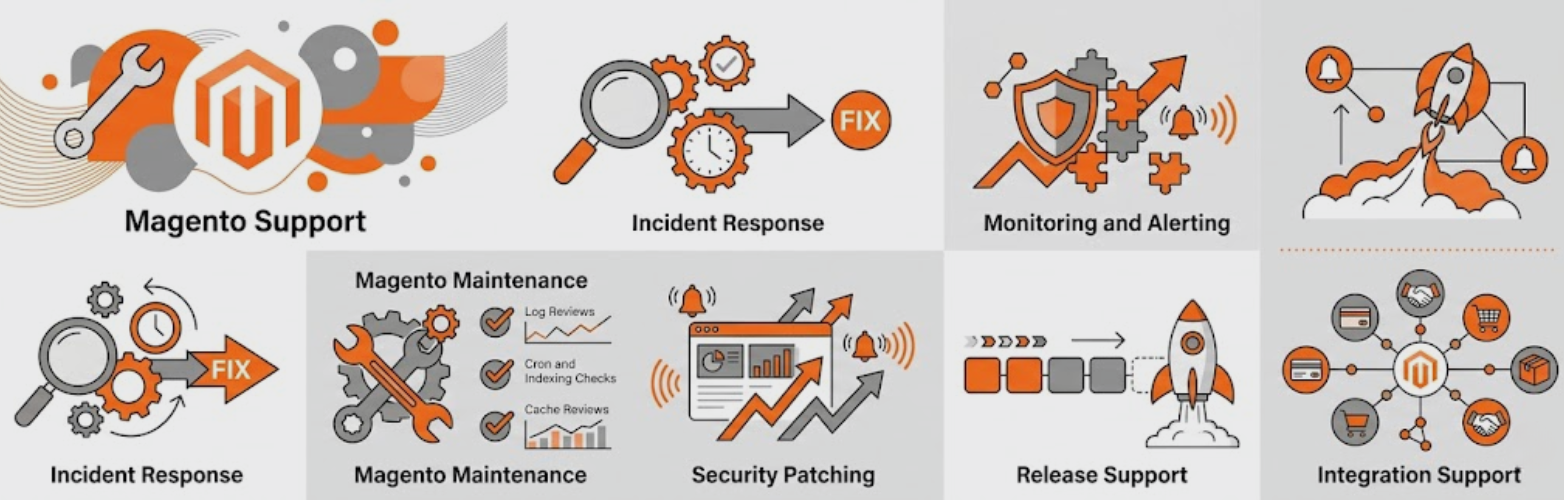
Magento support services are ongoing technical and strategic services provided to merchants running Adobe Commerce (Magento) storefronts. Unlike a one-off development project, support services provide the continuous care that keeps your store secure, performant, and competitive — month after month.
For ecommerce leaders, a well-structured Magento support plan is the operational backbone of your platform investment. It bridges the gap between your team’s capacity and the specialised expertise Magento demands — from security patches and extension compatibility to caching configuration and infrastructure scaling.
Magento’s open-source architecture means unparalleled flexibility — but that flexibility comes with complexity. Unlike SaaS platforms, Adobe Commerce does not manage updates, security patches, infrastructure, or performance tuning on your behalf. That responsibility falls entirely to you, or to a qualified managed Magento support partner.
Adobe Commerce (formerly Magento 2 Enterprise Edition) and Magento Open Source both require active support and maintenance. Adobe Commerce cloud hosting includes infrastructure management, but application-layer support — security patches, custom extensions, performance — still requires a specialist partner or in-house team.
What Is Included in Magento Support Services?
What is included in Magento support services?
Good Magento support services typically include the following core components:
- Security patch management — applying Adobe’s quarterly and emergency security patches
- Performance monitoring & optimisation — uptime checks, load-time audits, caching tuning
- Bug investigation & resolution — fixing errors in core, custom code, and third-party extensions
- Extension & dependency updates — keeping Composer packages, modules, and integrations current
- Server & infrastructure management — PHP, MySQL, Redis, Elasticsearch, Varnish monitoring
- Backup & disaster recovery — scheduled backups, tested restore procedures
- Developer on-call response — SLA-backed access to certified developers for urgent issues
- Quarterly technical reviews — strategic roadmap alignment, performance benchmarking
Security & Patch Management
Adobe releases security patches on a quarterly cycle, with out-of-band emergency patches for critical vulnerabilities. Adobe’s security bulletin page lists every patch — but reading it is the easy part. Applying patches across custom codebases, verifying compatibility with installed extensions, staging, testing, and deploying requires expertise and discipline that most in-house teams lack.
A comprehensive Magento support service monitors Adobe’s releases and applies security patches within defined SLA windows — typically within 24 hours for critical (CVSS 9+) and within 7 days for high-severity patches.
Performance Monitoring & Optimisation
Page load time is one of the highest-leverage variables in ecommerce conversion. Research from Google’s web.dev team consistently shows that every 100ms improvement in load time correlates with measurable lift in conversion rate. Good Magento maintenance includes:
- 24/7 uptime monitoring with immediate alerting
- Core Web Vitals tracking (LCP, FID/INP, CLS)
- Full-page cache (FPC) health monitoring and tuning
- MySQL slow query analysis and index optimisation
- PHP-FPM and OPcache configuration reviews
- CDN cache hit ratio monitoring
Bug Fixes & Development Support
Bugs in a live store cost money every minute they persist. Whether it’s a broken checkout flow, a misbehaving product filter, or a silent payment gateway failure, your support team should be able to triage, diagnose, and resolve issues rapidly. Retainer-based Magento support packages typically include a bank of developer hours per month — enough to handle reactive issues and leave room for small proactive improvements.
Extension & Integration Management
Most production Magento stores run 30–80+ third-party extensions. Extension updates introduce compatibility risks, especially after Magento core upgrades. A managed Magento support partner tracks extension release notes, tests updates in staging, and coordinates upgrades to minimise disruption.
Stores that go 12+ months without extension updates accumulate compatibility debt that can make future Magento upgrades extremely expensive — or force complete rebuilds of custom functionality.
SLA Expectations for Magento Support Plans
A Service Level Agreement (SLA) defines the contractual response and resolution time commitments your support partner makes. Without clear SLAs, “24/7 support” is a marketing phrase, not a binding commitment.
The industry-standard priority framework for Magento support is a four-tier system (P1–P4), aligned to business impact:
| Priority | Definition | Response Time | Resolution Target | Example |
|---|---|---|---|---|
| P1 — Critical | Site down or checkout broken | ≤ 1 hour | ≤ 4 hours | 500 errors on all pages, payment gateway failing |
| P2 — High | Major feature non-functional | ≤ 4 hours | ≤ 24 hours | Search not returning results, account login broken |
| P3 — Medium | Minor feature impaired | ≤ 24 hours | ≤ 5 business days | Wishlist not saving, PDF invoice formatting issue |
| P4 — Low | Cosmetic or informational | ≤ 72 hours | Next sprint | Minor layout misalignment, report discrepancy |
What to Look for in an SLA
Strong Magento support plans do more than state response times. Look for SLAs that specify:
- Business hours vs. 24/7: Is P1 coverage genuine round-the-clock, or only during UK/US business hours?
- Named contacts vs. ticket queues: Does escalation reach a human or a helpdesk bot?
- SLA credits: What compensation do you receive if the partner misses their commitments?
- Uptime guarantees: Is there a stated infrastructure availability SLA (e.g. 99.9%)?
- Communication cadence: How are you kept informed during an active incident?
An SLA without financial or service credits for breach is a promise without teeth. Any credible Magento support partner should be willing to back their commitments with meaningful remedies.
Managed Magento Support vs. Ad-Hoc Development
Many merchants try to handle Magento maintenance through ad-hoc freelancer or agency relationships — calling for help only when something breaks. This reactive model seems cheaper on paper, but consistently proves more expensive in practice.
| Factor | Managed Magento Support | Ad-Hoc / Reactive Only |
|---|---|---|
| Security patching | ✓ Proactive & tracked | ✗ Applied only after breach |
| Incident response | ✓ SLA-guaranteed | ⚡ Best-effort, variable |
| Monthly cost | £1,500–£8,000/mo retainer | £0 until crisis (then £3k–£20k+) |
| Store knowledge | ✓ Deep, accumulated context | ✗ Rebuilt each engagement |
| Performance monitoring | ✓ Continuous | ✗ None until complaints |
| Upgrade planning | ✓ Proactive roadmap | ✗ Forced, rushed upgrades |
| Technical debt accumulation | ✓ Actively managed | ✗ Compounds unchecked |
The fundamental advantage of managed Magento support is institutional knowledge. A retained partner understands your codebase, your integrations, your traffic patterns, and your business cycle. When a P1 incident hits at 11pm on the night of your biggest sale, that context is priceless.
What Unmanaged Magento Stores Risk
Running a Magento store without active support is not a neutral position. The longer a store goes without maintenance, the more it accumulates technical debt, security exposure, and performance degradation — each compounding the others.
⚡ Magecart & Skimming Attacks
Outdated stores are primary targets for Magecart-style JavaScript injection, silently harvesting customer card data. Adobe Commerce has been specifically targeted in multiple high-profile attacks. Unpatched vulnerabilities in checkout pages remain the most common entry point.
📉 Performance Degradation
Without proactive monitoring, caches fill with stale data, MySQL tables fragment, and log files grow unchecked. A store that loads in 2 seconds today may load in 6+ seconds within 18 months — silently eroding conversion rates and SEO rankings.
💰 Upgrade Debt & Rebuild Costs
Every major Magento version skipped makes the eventual upgrade geometrically more expensive. Extensions on incompatible versions, deprecated APIs, and accumulated customisations can turn a manageable upgrade into a full-scale rebuild costing £80,000+.
⚠️ PCI DSS Non-Compliance
PCI DSS compliance requires that ecommerce platforms run supported, patched software. Unmanaged Magento stores routinely fail PCI scans — exposing merchants to fines, card brand penalties, and potential loss of payment processing rights.
📦 Extension Incompatibility Cascade
When one critical extension becomes abandoned or incompatible, it can block all other updates — including security patches. Without a managed approach to dependency tracking, this cascade can lock stores into insecure configurations indefinitely.
🔍 SEO Regression
Core Web Vitals are a confirmed Google ranking factor. Unmonitored Magento stores frequently suffer LCP and CLS regressions after extension updates, costing organic traffic without anyone noticing until rankings have already dropped.
IBM’s 2024 Cost of a Data Breach Report puts the average ecommerce breach at $4.88 million globally — including regulatory fines, customer notification, brand damage, and remediation. A fully managed Magento support retainer costs a fraction of a single incident.
Magento Support Packages: Retainer Tier Comparison
Not every store needs enterprise-grade support, and not every budget can sustain it. Good Magento support packages are tiered to match business scale, risk tolerance, and growth stage. Below is a representative framework:
- Security patch monitoring & application
- Monthly performance report
- Uptime monitoring (99.5% SLA)
- P1 response within 4 hours
- 5 developer hours/month
- Extension update tracking
- Proactive optimisation sprints
- Dedicated account manager
- Quarterly technical reviews
- Everything in Essentials
- P1 response within 1 hour (24/7)
- 15 developer hours/month
- Quarterly technical strategy review
- Core Web Vitals monitoring
- Extension & dependency audits
- Staging environment management
- Dedicated account manager
- Custom SLA terms
- Everything in Growth
- P1 response within 30 minutes
- 40+ developer hours/month
- Custom SLA & penalty terms
- Dedicated lead developer
- Monthly architecture reviews
- Proactive A/B & CRO support
- Infrastructure design input
- Executive reporting
The tiers above are a starting framework. A credible support partner will scope your specific store — extension count, traffic profile, integration complexity, and team capabilities — before recommending a tier. Be wary of partners who quote without auditing.
How to Evaluate a Magento Support Partner
Choosing a Magento support partner is a long-term relationship decision. The wrong partner costs you more in reactive scrambling, escalating technical debt, and erosion of trust than you’d ever save on a lower retainer fee. Here’s how to evaluate candidates rigorously:
1. Certifications & Adobe Partnership Status
Adobe Commerce certification signals that developers have passed standardised assessments covering Magento architecture, customisation, and best practices. Look for partners with certified Adobe Commerce Developers, Solution Specialists, and — for enterprise engagements — Adobe Solution Partners. Check the Adobe Solution Partner Directory to verify claimed partnership status.
2. Industry Experience & Reference Clients
Ask for at least three reference clients in a similar vertical (B2B vs. B2C, similar order volume, similar tech stack). Speak to those references directly. Ask specifically about incident response experience — how the partner performed under pressure is more revealing than how they perform during normal operations.
3. Onboarding Process & Technical Discovery
A thorough onboarding process is a positive signal. Partners who invest in a deep technical audit — reviewing your codebase, extension inventory, server configuration, and security posture — before committing to a scope are demonstrating the diligence that makes them trustworthy long-term. A partner who wants to sign you up without understanding what they’re taking on should raise flags.
4. Transparency & Reporting
Monthly reporting should show: hours consumed vs. contracted, incidents raised and resolved (with resolution times vs. SLA), security patch status, performance metrics trend, and upcoming risks on the roadmap. If a partner can’t produce a clear monthly report, they can’t demonstrate the value of the retainer — and likely aren’t running the proactive processes they’ve promised.
5. Communication Culture
How a potential partner communicates during the sales process is a proxy for how they’ll communicate during a 2am incident. Do they respond quickly? Are their answers specific and technical, or vague and salesy? Do they proactively share relevant information, or wait to be asked?
Partner Evaluation Checklist
Magento Maintenance: The Technical Essentials

Magento maintenance encompasses the recurring technical activities that keep a production store healthy. Understanding these activities helps ecommerce leaders hold their support partners accountable — and identify gaps in current coverage.
Security Maintenance
- Adobe Security Patches: Applied within defined SLA windows; tested in staging before production deployment
- Dependency audits: Composer packages audited for known CVEs via tools like
composer auditandroave/security-advisories - Admin panel hardening: Two-factor authentication, IP allowlisting, custom admin URL rotation
- WAF & bot protection: Application-layer firewall rules tuned for Magento-specific attack patterns
- PCI DSS scan compliance: Regular ASV scans; remediation of findings
Infrastructure & Server Maintenance
- PHP version management (following PHP supported versions lifecycle)
- MySQL / MariaDB table optimisation, slow query log analysis
- Redis cache health monitoring and memory management
- Elasticsearch / OpenSearch index health and reindexing management
- Varnish cache hit ratio monitoring and VCL tuning
- Log rotation, disk space management, cron health
Application Maintenance
- Full page cache (FPC) warm-up and invalidation management
- Magento cron job health monitoring and error alerting
- Indexer status monitoring and automated reindex scheduling
- Database deadlock detection and resolution
- Order queue and message queue health monitoring
How Often Should Maintenance Happen?
| Task | Frequency | Who Performs It |
|---|---|---|
| Uptime & performance monitoring | Continuous (automated) | Support team tooling |
| Security patch review | Weekly check; apply as released | Support engineer |
| Extension update review | Monthly | Support engineer |
| Database optimisation | Monthly | Support engineer |
| Log review & cleanup | Monthly | Support engineer |
| Backup verification | Monthly | Support engineer + client sign-off |
| Core Web Vitals audit | Quarterly | Support engineer |
| Security penetration test | Annually (minimum) | Specialist third party |
| Full architecture review | Annually | Senior architect |
Ready to Compare Magento Support Tiers?
See exactly what each tier includes, what SLAs are guaranteed, and which level matches your store’s scale and risk profile.
Frequently Asked Questions: Magento Support Services
Further Resources
Adobe & Official Resources
- Adobe Commerce Security Bulletins — official patch releases and CVE notifications
- Adobe Solution Partner Directory — verify partner status
- Adobe Commerce Developer Documentation — architecture, APIs, best practices
Performance & Security Standards
- Google web.dev: Performance — Core Web Vitals guidance
- PCI DSS documentation library — compliance requirements for ecommerce
- OWASP Top 10 — web application security risks relevant to Magento